Vista Start Menu 6.3
 Each time you start programs from the Start menu, you use the interface that has not changed for 10 years.
|

 0.00
0.00  Freeware
 0K
0K
 Windows Vista
Each time you start programs from the Start menu, you use the interface that has not changed for 10 years. No wonder that it becomes more and more difficult to use it due to the increase in the number of programs...
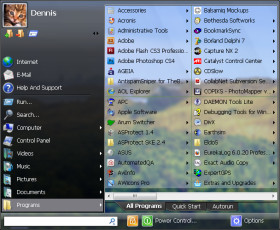
Vista Start Menu is a completely another approach to the interface. In the process of development we were oriented towards how people perceive information and also towards the ability to remember the position of items.
All you see in the standard menu is a long list and you have to read most names in order to find the program you need. Vista Start Menu will show program icons that is why it is a lot easier to find the program you need with just one glance. Besides, the programs are arranged in a table visually divided into sections, which also contributes to finding what you need in no time.
With Vista Start Menu, you just open the menu and click the program icon. If you need supplemental files installed together with the program, just move the mouse pointer over the icon and you will see a submenu where you can find all you need.
Vista Start Menu retains the position of icons that is why when you install or remove programs, icons remain in their places. You do not have to spend time on looking for an icons that has "slid away" as it usually happens in the standard menu.
You can also purchase an extended version of the program, which includes the following features:
NOTE: The program uses a system of hooks for integration with the "Start" menu. A hook is a special library named VistaStartMenu.dll. It detects when the user moves the mouse pointer to the "start" button in order to replace the standard menu with its own one. Some firewalls detect adding new hooks because they can be used for spying and inform you about it.
Vista Start Menu neither spies on the user nor sends any data via the Internet if it is downloaded from the developers' official site. We are not responsible for software obtained from other sources.
Limitations
tags start menu the program vista start you need icons that the start standard menu the standard menu you the pro pro version the mouse mouse pointer
Download Vista Start Menu 6.3

Similar software
 Vista Start Menu 6.3
OrdinarySoft
Each time you start programs from the Start menu, you use the interface that has not changed for 10 years.
 Seek 2.0.2
Phi
Navigating the Start Menu can be a hassle, especially if you have installed many programs over time.
 StartMenu 1.5
Gasaw Software
StartMenu - the program for fast, convenient and visual start of programs.
 Start Menu Cleaner 1
Marcus Wynwood
Start Menu Cleaner is a simple little program that looks at all the shortcuts in your Start Menu to see if they work.
 NewStartMenu 1.00 build 100
HongDi soft development co.,ltd.
NewStartMenu can replace your start menu with your own menu, it is easy to use! you can switch between your start menu and windows start menu.
 Express Menu 1.0.2036
BullZip
Express Menu is a supplement to the Windows Start Menu.
 Tidy Start Menu 4.33
OrdinarySoft
If you feel tired of searching for programs in the long "Start Menu" list, then this program is for you.
 TrayLink 3.2
Traylink.com
TrayLink is a powerful alternative to the Windows start menu.
 HotRun 2.4
Stanislav
The program HotRun is useful for quick launch of the programs and opening of the documents.
 Engage 1.2.3.89
LyricCode Software
Stop wasting time hunting through your Start Menu.

 RSS
RSS