Targa Menu 2.1
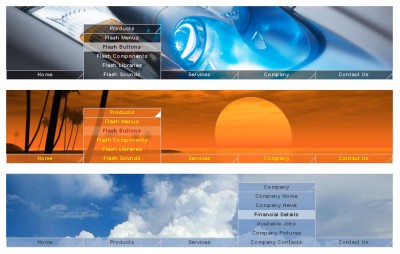
 Targa menu XML is a useful menu made in flash but it does not require flash to run, you can use almost any HTML editor to insert the menu in a web page, it is a simple flash file (swf file), the menu can be customized by editing a configuration file (the XML file) that will be placed in the same directory with the menu, so you can customize the menu using any text editor.
|

 25.00
25.00  Demo
Demo 0K
0K
 Windows Vista
Targa menu XML is a useful menu made in flash but it does not require flash to run, you can use almost any HTML editor to insert the menu in a web page, it is a simple flash file (swf file), the menu can be customized by editing a configuration file (the XML file) that will be placed in the same directory with the menu, so you can customize the menu using any text editor.
Here are the options that you can set by it`s configuration file:
- Background file, this can be a jpg like the samples above or a swf file (animation, banners etc)
- Buttons text - Buttons URL to open
- The target frame of the URL to open (same window, new window...)
- Menu color and transparency
- Rollover effect color and it`s transparency
- Buttons text color - Rollover delay, the milliseconds to wait until the menu will move up (or down) when mouse is over it.
- Buttons text color on rollover
- Sound effects volume (from 0 to 100)
- (new) Buttons size
- (new) Buttons color can now be different for main buttons and sub buttons
- (new) Blinking corner enabled / disabled
- (new) Menu speed (up speed and down speed)
- (new) Change menu type (popup or drop down menu)
- (new) Buttons actions (open a link, go to a keyframe, load a movie, call a function and more...)
- (new) Unlimited number of buttons and sub buttons.
tags the menu new buttons you can buttons text buttons and and sub sub buttons swf file text color file the color and configuration file
Download Targa Menu 2.1

Purchase:  Buy Targa Menu 2.1
Similar software
Targa Menu 2.1
AdrianTNT
Targa menu XML is a useful menu made in flash but it does not require flash to run, you can use almost any HTML editor to insert the menu in a web page, it is a simple flash file (swf file), the menu can be customized by editing a configuration file (the XML file) that will be placed in the same directory with the menu, so you can customize the menu using any text editor.
 Total Menu 2.3
Flash-Extensions.net
We are offering you a universal flash menu tool where you can customize practically any parameter.
 Micro Menu 2.1
AdrianTNT
Micro Menu is a useful and reliable menu made in flash but it does not require flash for customization; you can use almost any HTML editor to insert the menu in a web page and customize it.
 Clix-FX XML Flash Menus 1.6
Clix-FX
To create your own Flash Menu websites is as easy as it gets by using Flash XML Menu Templates from Clix-FX.
 Cromas xml menu 1.1
adrianTNT
Cromas xml menu is a beautiful menu made in Flash MX, it does not require Flash to be used, all you need is to enter the swf file in your web page and edit a configuration file.
 Simple Menu XML 1.0
AdrianTNT
Simple Menu XML is a free tool that is made in macromedia flash, easy to configure by it`s external configuration file (XML file), it does not require macromedia flash to be used, all you need is the free macromedia flash player which is installed on almost any web browser.
 Flash Horizontal Menu Wizard 2.0
Gokhan Dagli
Flash Horizontal Menu Wizard is a tool that allows you to design your Flash based dropdown menu Flash in a few minutes and instantly see the results.
 CX Nav Bar 2.1
AdrianTNT
CX Nav Bar is a useful navigation menu made in macromedia flash which is easy to use, all you have to do is insert the swf file in your web page like any other flash file and place the XML configuration file next to the page that contains the menu (flash file), you can edit the configuration (XML file) with a text editor like notepad from windows.
 Drop Down Flash Menu 3.0.0
f-source.com
Drop Down Flash Menu is a dreamweaver extension which is actually an easy to configure flash menu.
 Vertical Flash Menu 1.10
BitWorks Sweden
Vertical Flash Menu helps you create Flash Buttons or a Flash Menu System in minutes.

 RSS
RSS