Simple Menu XML 1.0
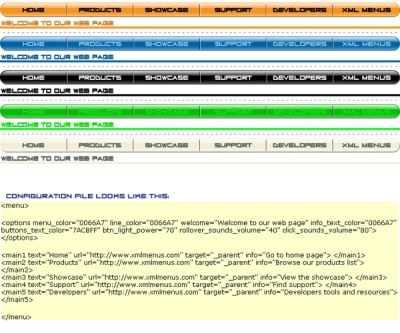
 Simple Menu XML is a free tool that is made in macromedia flash, easy to configure by it`s external configuration file (XML file), it does not require macromedia flash to be used, all you need is the free macromedia flash player which is installed on almost any web browser.
|

 0.00
0.00  Freeware
 0K
0K
 Windows Vista
Simple Menu XML is a free tool that is made in macromedia flash, easy to configure by it`s external configuration file (XML file), it does not require macromedia flash to be used, all you need is the free macromedia flash player which is installed on almost any web browser.
From the menu`s configuration file you can set options like:
-buttons text
-buttons URL to open and target frame
-menu color
-info text for each button
-color for info text
-line color-welcome text
-buttons text color
-button`s light transparency
-sound effects volume
-menu width
-number of buttons (unlimited)
To use the menu you have to edit it`s configuration file with a text editor like windows notepad and save the XML file as UTF-8 encoding, windows notepad has this option when you save the file.
You can rename the swf and XML default file name but always make sure the swf and XML files are having the same name, for example, "my_menu1.swf" has to find the config file called "my_menu1.xml".
When you set the colors in the XML file enter the color code without the # sign in front of the color code.
Bg color for the swf file can be set from the swf file code in the html page.
tags the swf macromedia flash xml file configuration file swf and when you the color swf file color code the xml and xml color for you can
Download Simple Menu XML 1.0

Similar software
Simple Menu XML 1.0
AdrianTNT
Simple Menu XML is a free tool that is made in macromedia flash, easy to configure by it`s external configuration file (XML file), it does not require macromedia flash to be used, all you need is the free macromedia flash player which is installed on almost any web browser.
 CX Nav Bar 2.1
AdrianTNT
CX Nav Bar is a useful navigation menu made in macromedia flash which is easy to use, all you have to do is insert the swf file in your web page like any other flash file and place the XML configuration file next to the page that contains the menu (flash file), you can edit the configuration (XML file) with a text editor like notepad from windows.
 Total Menu 2.3
Flash-Extensions.net
We are offering you a universal flash menu tool where you can customize practically any parameter.
 Macromedia style menu for Dreamweaver 3.0.2
f-source.com
Dreamweaver MX 2004 allows you to create object based on flash element and place them in your Document window.
 Drop Down Flash Menu 3.0.0
f-source.com
Drop Down Flash Menu is a dreamweaver extension which is actually an easy to configure flash menu.
 Clix-FX XML Flash Menus 1.6
Clix-FX
To create your own Flash Menu websites is as easy as it gets by using Flash XML Menu Templates from Clix-FX.
 Targa Menu 2.1
AdrianTNT
Targa menu XML is a useful menu made in flash but it does not require flash to run, you can use almost any HTML editor to insert the menu in a web page, it is a simple flash file (swf file), the menu can be customized by editing a configuration file (the XML file) that will be placed in the same directory with the menu, so you can customize the menu using any text editor.
 Micro Menu 2.1
AdrianTNT
Micro Menu is a useful and reliable menu made in flash but it does not require flash for customization; you can use almost any HTML editor to insert the menu in a web page and customize it.
 F-IN-BOX .NET Edition 3.0.6
Softanics
F-IN-BOX is a developer's library to enhance Macromedia Flash Player ActiveX features.
 Metallic Menu bar for Dreamweaver 1.0.0
f-source.com
Flash menu.

 RSS
RSS