Add Contacts 1.8.1
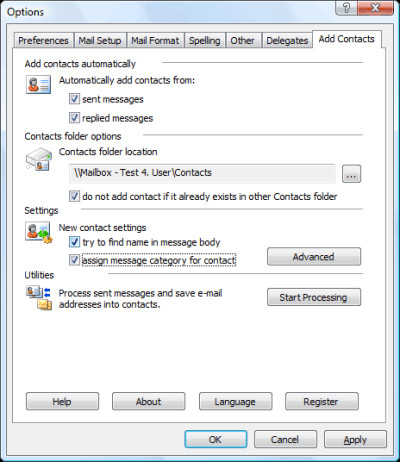
 Add Contacts will automatically add email addresses to the contact folder when you reply a message and/or send a new message.
|

 15.00
15.00  Trial
Trial 0K
0K
 Windows Vista
Add Contacts will automatically add email addresses to the contact folder when you reply a message and/or send a new message.
This will help you avoid losing addresses of people you correspond with. Moreover, the collected addresses can be used for mail filtering.
For example, you can use the Rule Wizard to have messages from certain senders (whose addresses are there in the address book) placed in a separate folder to ensure that their message will be dealt with greater priority and no important messages will be lost with deleted spam.
Some spam filters also check the contact folder to rule out erratic response for recognized senders.
When a contact is being created, the add-in attempts at detecting the name corresponding to the e-mail address automatically.
So, if you have received a message from the address "John Smith" , the new contact created by the program will be named John Smith. However, if name detection fails, the add-in attempts at retrieving it from the message body.
For example, if your message begins with the string "Dear John, :", the program will automatically extract the name from the greeting and create a contact named John. You can disable automatic name detection in the program settings.
You can also enable the option of category assigning to created contacts. If a category is assigned to a message while sending, the same category will be assigned to the created contact.
Microsoft Outlook add-in. You can choose any folder as the contact destination, either in your personal mailbox or in public folders on Microsoft Exchange server.
When adding a contact, Add Contacts checks the folder for possible duplicates. In the program settings, you can also instruct Add Contacts to search for contact duplicates, over all contact folders in your personal mailbox besides the specific destination folder.
Add Contacts features
Limitations
tags you can add contacts the program the contact from the the name message body the message settings you personal mailbox your personal can also name detection
Download Add Contacts 1.8.1

Purchase:  Buy Add Contacts 1.8.1
Similar software
Add Contacts 1.8.1
MAPILab Ltd.
Add Contacts will automatically add email addresses to the contact folder when you reply a message and/or send a new message.
 Public Contact After Reply for Outlook 1.2
SDMD GmbH
Public Contact after Reply for Outlook (Public CAR for Outlook) is an small and useful addon for Microsoft Outlook, which create automatically Outlook contacts after reply to a received E-Mail.
 Contacts Clinic for Microsoft Outlook 3.0
Srimax Software Technology
Contacts Clinic is a handy add-on for Microsoft Outlook, that allows users to manage and verify your Contact information.
 Auto Reply Manager for Outlook 1.5.22
DS Development
Auto Reply Manager lets you to easily define and send auto email replies right from your desktop, notifying your contacts that you are away, confirming incoming email messages or simply sending custom email templates.
 ContactsCollector 1.10
StanfordTrident Inc
ContactsCollector adds people you correspond with to your Address Book of Microsoft Outlook: it checks your outgoing mail for a new email addresses, retrieves the new contact name that corresponds to the email address and adds the contact.
 ADV Mass Mailer for Outlook 2000/XP/2003 2.0
Advancity Internet Solutions
ADV Mass Mailer is a program for Microsoft Outlook 2000 and Outlook XP to allow the users send mass mail to the contacts in their Contacts folders.
 You Perform 1.1.4
You Software Inc
15 indispensable Outlook Add-ins that cut through email overload and make Outlook work the way you want it to work.
 Bells & Whistles for Outlook 3.01.62
DS Development
Bells & Whistles for Outlook helps users to quickly reply to emails by automatically inserting personalized email reply greetings, reply subject counters, text templates or even silent email notes.
 D-Net Contact Keeper 1.1
D-Net Software
Contact keeper is a small application for cataloging your addresses, contacts name, email addresses, messenger nicknames, phone numbers and your notes for each contact.
 E-mail Follow-Up 1.12
MAPILab Ltd
E-mail Follow-Up allows (and reminds you!) to send follow-up e-mail messages if a reply has not been received within a specified time-frame.

 RSS
RSS