XP Web Buttons 3.52
 XP Web Buttons is a tool that allows you to create superior XP-style web buttons and menus in just a few clicks.
|

 29.00
29.00  Trial
Trial 0K
0K
 Windows Vista
XP Web Buttons is a tool that allows you to create superior XP-style web buttons and menus in just a few clicks.
XP Web Buttons enables you to produce stunning looking buttons and navigation bars for your web pages with ease.
XP Web Buttons generates all button images, Javascript and HTML code on the fly, so you don't need any additional graphics or programming skills, and you'll get instant results.
The buttons are fully customizable, they react to mouseover and mousedown events, support any XP themes, font face, font style, shadows, icons, alignment, links, targets, tooltips and more.
Once XP Web Buttons is installed you'll be making buttons for your web site quickly and easily: no programming or drawing skills required.
XP Web Buttons can create complete web menus as well as single images of buttons. These menus can be either horizontal or vertical and support "rollover" and "click" effects with a full set of Javascript and HTML code.
Web menus created by XP Web Buttons exactly correspond with Windows graphic interface components. That is why visitors to your site will not have to spend time familiarizing themselves with an unusual navigation scheme. Nevertheless, you are not limited by the standard Windows themes, so you can create your own original buttons as desired.
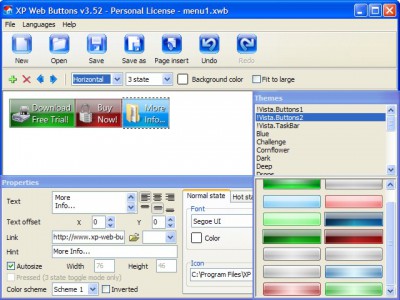
Each change of button-menu appearance is instantly displayed in the Preview Window. At the same time, you will be able to test how the buttons would respond to mouse events.
XP Web Buttons features
Its very easy to create professional high-quality web buttons with the help of XP Web Buttons. Once installed you’ll be making buttons for your web site with no programming or drawing required.
Each parameter of a button may be easily changed, allowing you to achieve the required result. You can set such parameters as direction, size, color, font face, font style, shadow, icons, alignment, links, targets, tooltips, word wrap, and other parameters. Any change can be undone by pressing "Undo" button.
XP Web Buttons is able to create not just separate images of buttons, but also complete web menus. These menus can be either horizontal or vertical, they support “rollover” and “click” effects with full set of javascript and html code.
Web menus, which are created by XP Web Buttons, exactly correspond with Windows graphic interface components. That is why the visitors of your site will not have to spend their time in order to familiarize with the unusually-looking navigation. Nevertheless, you are not limited by the standard Windows themes, and you will be able to create your own original buttons.
Each change of button-menu appearance is instantly displayed in the Preview Window. At the same time, you will be able to test how the buttons would respond to the mouse events.
You will not need any skills in javascript and html with XP Web Buttons. All programming will be completed for you. There even will be no necessity to edit your html code to insert a completed button-menu. Just point out the place on your page, where you want the buttons to be, and then press "Insert".
XP Web Buttons automatically generates images of buttons for normal, mouseover, and click states. There is also a feature of creation either static or 2-state buttons.
Everything you create with the program, has been saved in the Project File. This allows you either to continue your work at any time, or share your ideas with friends and colleagues. You can also save your menu as a HTML page, or export it as separate graphic images.
Limitations
tags web buttons and html the buttons you will javascript and html code web menus buttons for will not with the for your your web you can
Download XP Web Buttons 3.52

Purchase:  Buy XP Web Buttons 3.52
Similar software
 Web Buttons 3.1.5
Web-Buttons.com
Create nifty 3D web buttons in a few clicks!
Web Buttons program helps you create 3D rollover web buttons and menus with ease.
 Apycom Java Menus and Buttons 5.00
Apycom
Apycom Java Menus and Buttons is a collection of highly-configurable java applets that allows you to create browser-independent drop-down menus, bars, and buttons for your website.
XP Web Buttons 3.52
XP-Web-Buttons.com
XP Web Buttons is a tool that allows you to create superior XP-style web buttons and menus in just a few clicks.
 Free Web Buttons 1.01
Free-Web-Buttons.com
Free Web Buttons will help you in creating nice web buttons and menus in an easy way.
 Just Buttons 4.1
Lincoln Beach Software
Just Buttons creates web buttons that include javascript mouseover and mousedown events.
 Buttonmania 1.3.14.92
Berbt Levins
An application for use to create buttons in differant styles and shapes.
 Easy Web Buttons 3.2
Lincoln Beach Software
Easy Web Buttons will help you if you really need to create 3D web buttons and you need them yesterday and they have to look good this is the tool for you.
 Vertical Flash Menu 1.10
BitWorks Sweden
Vertical Flash Menu helps you create Flash Buttons or a Flash Menu System in minutes.
 1 Cool Button Tool - Flash 5.0
Juice Software
Spice up your site with animated buttons, menus, navigation schemes and other Flash files using this easy-to-use tool - you can even add MP3s.
 Button Blast 2.1
Spriteworks
Button Blast is a great collection of 300 beautifully textured buttons that can be used royalty-free in a variety of ways.

 RSS
RSS