WinSnap 6.2.3
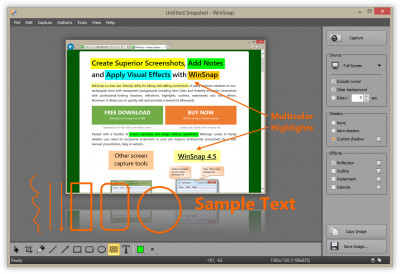
 Windows Snapshot Maker (shortly WinSnap) is a small enhancement utility for taking and editing screenshots.
|

 19.00
19.00  Shareware
 0K
0K
 Windows Vista
Windows Snapshot Maker (shortly WinSnap) is a small enhancement utility for taking and editing screenshots.
WinSnap automates all manual work and handle technical issues that previously you might perform only with Photoshop or other image editors. Initially, WinSnap was designed simply to take snapshots of non-rectangular windows, such as windows with XP visual styles, skinned media players, etc.
Now it is supplemented with professional smoothing shadows, coloring effects, canvas transformations, ability to automatically save images in various image formats and more.
WinSnap helps you easily make small thumbnail previews and full-sized screenshots for your web blog and home page, visualize technical and educational materials, send reduced-size images through email. You will perform professional screenshots immediatelly with one click!
WinSnap v2.x was especially designed for capturing the new Windows Vista UI. It can handle all possible issues with translucent window frames and rounded corners. WinSnap can draw a drop shadow effect which is very similar to the Aero theme.
Now shadows are semi-transparent! It allows really easy image compositing, and it is very useful when placing your screenshots on multi-colour backgrounds.
WinSnap v2.x allows you to select and capture multiple objects (e.g. windows, dialogs, buttons and controls) at once. Just place a few windows on the screen and easy combine them into one screenshot image.
You can quickly open screenshots in your favourite image editor using the Tools menu or shortcut keys. It also allows you to automatically save images into different directories and in different formats.
WinSnap features
NOTE: Registered users are able to download a Portable Edition of WinSnap. It is a special edition of WinSnap designed to run it from a removable media: USB flash drive, memory stick, iPod/MP3 player, network share, etc.
Limitations
tags allows you canvas transformations with one easy combine combine them and easy screen and them into one screenshot capture mode mode allows auto save advanced auto
Download WinSnap 6.2.3

Purchase:  Buy WinSnap 6.2.3
Similar software
 Windows Snapshot Maker 1.1 beta 4
NTWind Software
Windows Snapshot Maker (shortly WinSnap) is a free , useful and small enhancement utility for taking and editing screenshots.
WinSnap 6.2.3
NTWind Software.
Windows Snapshot Maker (shortly WinSnap) is a small enhancement utility for taking and editing screenshots.
 Xone8clipmaker 1.0
Amitm
A simple yet very efficient video clip maker application to be used with any Web cam, enable video clip creation (including wmv compression) snapshot taking, E-mail transmission of either video or snapshot and upload to Xone8 free service.
 Screenie 1.77
Screenie Software
Screenie is a lightweight but functional utility for taking screenshots of your Windows desktop.
 Easy Icon Maker 5.02
Icon-maker.com
Easy Icon Maker is a small and easy-to-use all-in-one icon utility for icon making, editing, changing, extracting, and searching .
 QwikSpy 2.0
Hurkin.com
QwikSpy runs silently taking snapshot images of the desktop every few minutes.
 Screenshot Utility 1.0
QSX Software Group
Screenshot Utility is a screen capture program.
 Little Parrot 1.0
Little Parrot
Little Parrot is a free, small but useful vocabulary enhancement/testing utility.
 Watcher 2.35
Olivier Lombart
The way Watcher works is pretty simple: basically, it starts by taking a snapshot of important parts of your Windows system; then it tracks changes (every time you log in, or whenever you want to).
 System Snapshot 2.0
Hkeylocal Executables
System Snapshot is a program designed to immediately create restore points for the Windows XP System Restore utility.

 RSS
RSS