Send Personally 3.3
 Add-in Send Personally (SPE) is designed to send messages to a great number of recipients via Microsoft Outlook 2-2003.
|

 24.00
24.00  Shareware
 0K
0K
 Windows Vista
Add-in Send Personally (SPE) is designed to send messages to a great number of recipients via Microsoft Outlook 2-2003.
Add-in offers an alternative method of sending messages from Outlook, separate message being created for each recipient.
The final recipient will get no information about the other recipients. Moreover, he/she will see only his/her name and address in the "To" field, as if the message was sent only to him/her. Send Personally is a tool that sends messages to a big number of recipients.
The main problem with sending messages through Outlook is that Outlook shows all the recipients in the message heading.
If the recipient list is relatively small, this doesn't result in any considerable inconvenience. However, if a message is sent to hundreds of recipients, its heading size might many times exceed the size of the message text and all attachments thereto.
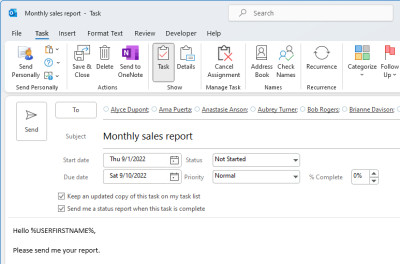
Send Personally offers an easy solution for the problem. And you won't need to perform any additional actions. The only thing you will have to do is to press the button "Send Personally" instead of the standard "Send" button (you will find it next to the latter).
With Send Personally, no special setup procedures are needed: it is ready to use right upon installation.
You can use macros (special expressions automatically replaced by recipient's personal data when sending a message) in message text. Using the macros, you can insert recipient's name, e-mail address, as well as the name of Outlook distribution list containing his/her address at the moment of sending, into a message.
When creating a message, you can choose addresses to be excluded from the distribution list. To do that, simply create a new Outlook distribution list which name starts with the word "exclude", add the addresses to be excluded into that list, and enter the list name along with the others into the "To" field of the message being created.
Requirements
Limitations
tags send personally the message microsoft outlook you can distribution list with the you will outlook distribution message text message being being created his her sending messages
Download Send Personally 3.3

Purchase:  Buy Send Personally 3.3
Similar software
Send Personally 3.3
MAPILab Ltd.
Add-in Send Personally (SPE) is designed to send messages to a great number of recipients via Microsoft Outlook 2-2003.
 Send Personally for Outlook Express 1.3
MAPILab Ltd.
Send Personally for Outlook Express allows to send messages to a great number of recipients from Microsoft Outlook Express.
 Outlook Express Group Mail 1.0
outlook-express.us
Outlook Express Group Mail is a OE plug-in allows to send messages to a great number of recipients separately from Outlook Express.
 SMSCOUNTRY SMS Mail Box 1.1
SMSCOUNTRY
SMSCountry SMS Mail Box - You can send sms from Microsoft Outlook and it is as simple as sending an email.
 Auto BCC/CC for Outlook 2.0
Afalina Co., Ltd.
Auto BCC / CC for Microsoft Outlook is an advanced email add-in for Microsoft Outlook that automatically creates a BCC and/or a CC copy every time you send mail.
 Email Scheduler 1.3
MAPILab Ltd.
Email Scheduler is a convenient e-mail delivery scheduler for MS Outlook 2000/XP/2003 allowing you to send messages on given time even if you are away from computer.
 Mail Merge Toolkit 7.3.0
MAPILab Ltd.
Mail Merge Toolkit is powerful add-in for Microsoft Office 2002 (XP) and 2003 designed to extend mail merging capabilities in Microsoft Outlook, Microsoft Word and Microsoft Publisher.
 Send2 1.20.0456
4Team Corporation
The Send2 is a useful plug-in that extends standard Microsoft Outlook functionality.
 Desktop SMS 1.2.0.64
Interactive Digital Media
Desktop SMS enables you to send SMS messages from Outlook.
 @SMS personal Outlook Light 3.0
Alphaobjects GmbH
@SMS personal Outlook is designed for the professional use of SMS with Microsoft Outlook.

 RSS
RSS