MiniCap 1.42.01
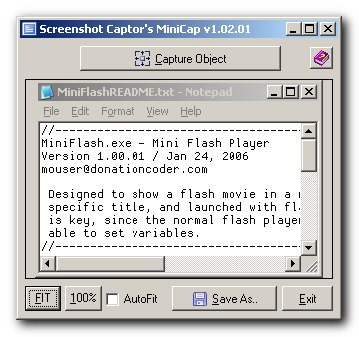
 MiniCap is a minimal screenshot capture app, with good commandline support, including the ability to launch (and then terminate) apps, capture windows by handle or object name.
|

 0.00
0.00  Freeware
 0K
0K
 Windows Vista
MiniCap is a minimal screenshot capture app, with good commandline support, including the ability to launch (and then terminate) apps, capture windows by handle or object name.
But the most common way to use MiniCap is with commandline arguments for non interactive capture:
-save "OUTPUTFILENAME"
-closeapp
-killapp
-sleep #
-capturerunapp
-capturehwnd #
-capturepid #
-captureregion left top right bottom
-capturedesktop
-captureappbyname "filename.exe"
-exit
-scrollcap
-setfore
-run "APPNAME" [args+]
-runcap "APPNAME" [args+]
Example:
MiniCap.exe -save "C:screen_$appname$$uniquenum$_$date$.jpg" -closeapp -exit -sleep 4 -capturerunapp -run "C:Program FilesMacromediaFlashPlayer.exe" "C:MyMovie.swf"
MiniCap.exe -capturerunapp -exit -save "D:desktop.png" -sleep 5 -closeapp -exit -run "C:WINDOWSsystem32notepad.exe" "C:WINDOWStest.txt"
MiniCap.exe -save "E:test.jpg" -runcap "C:WINDOWSsystem32notepad.exe" "C:WINDOWStest.txt"
tags the app capture the minicap exe closeapp exit automatically capture after the the specified appname args exit sleep windowstest txt exe save windowssystem32notepad exe before capturing
Download MiniCap 1.42.01

Similar software
MiniCap 1.42.01
Mouser
MiniCap is a minimal screenshot capture app, with good commandline support, including the ability to launch (and then terminate) apps, capture windows by handle or object name.
 Screenshot Captor 4.36.1
DonationCoder
Screenshot Captor was designed for grabbing screenshots with minimal intervention.
 Wsnap 1.3
wsnap.com
Wsnap is a screen capture tool that lets you take a screenshot of any portion of the screen.
 Capture-A-ScreenShot 1.08
PopDrops.com
Capture-A-ScreenShot is a simple to use free screen capture software utility that captures screenshots.
 Screenshot Utility 1.0
QSX Software Group
Screenshot Utility is a screen capture program.
 GameScreen .1
TSH of The 4Life Network
GameScreen is a free and powerful screenshot application which allows you to take a screenshot using a customized hotkey (for example, Left CTRL and W, or X), saving the screenshots in a selected format (BMP, JPG, PNG, TIFF, or TGA) and putting them into a directory.
 VividScreenshot 1.0
Vivid Designs
VividScreenshot is an application developed to allow you to capture screen shots.
 Easy Screenshot Reloaded 3.0
dewave Software
Easy Screenshot Reloaded helps you to capture quick screenshots.
 Abracadabra Instant Screenshot 1.48
Abracadabra Solutions
Abracadabra Instant Screenshot is an easy to use and versatile screenshot capture and edit utility.
![[FireLion] Screen Capture 1.0](https://goimg.gosoftware.org/screenshots/[/f/[firelion]-screen-capture.jpg "[FireLion] Screen Capture 1.0") [FireLion] Screen Capture 1.0
[FireLion] Screen Capture 1.0
The-Best-Soft
The Easiest and the Fastest screen capture (screenshot) is released.

 RSS
RSS