GeniusConnect 6.0.2.2
 Microsoft Outlook stores Contact data (Name, Address, E-mail, etc.
|

 99.00
99.00  Demo
Demo 0K
0K
 Windows Vista
Microsoft Outlook stores Contact data (Name, Address, E-mail, etc.) on the local computer in a file called “.pst” file. It is difficult to exchange this data with other systems or applications.
GeniusConnect is a software that allows you to synchronize data.
Changes to an E-mail address, phone number or name in a central database will never effect Outlook Contact data stored on other workstations.
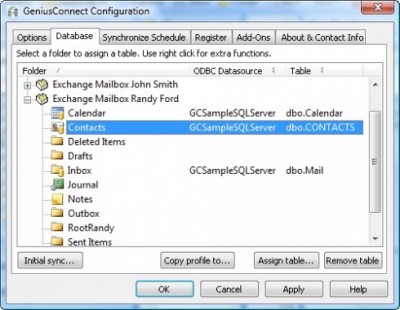
GeniusConnect makes it possible to synchronize Contact data with any relational database that supports ODBC (Open database connectivity).
GeniusConnect supports loading data from the database into an Outlook® contact folder or storing data from Outlook into the database. It is possible to use GeniusConnect on multiple Outlook Contact Folders and multiple databases.
The user can protect his private contact data by using a different Contact Folder to store private contacts or by telling GeniusConnect to ignore Contacts that are marked as private.
GeniusConnect features
Load the current database data for the selected Contact Item(s) and update Contact Item(s) data. The selected Contact Item(s) will be updated only if a database record exists.
Store the selected Contact Item(s) data into the database. If a database record already exists the data will be updated, if a database record doesn’t exists a new record will be inserted.
Load all database records and store them into the current Contact folder. If a Contact Item already exists, the Contact data will be updated; if the Contact Item doesn’t exist, a new Contact Item will be inserted into the Contact Folder.
Store All Contact Items from the current Contact Folder into the database. If a database record already exists the data will be updated; if a database record doesn’t exists a new record will be inserted.
Ignore all Contact Items that are marked as private.
Never update Contact data that already exists in the Contact Folder
Never update Database data that already exists in the Database
Delete Outlook Contact Items that are not present in the database.
Automatically Load or store Contact Data for all Contact Folders that are linked to the database.
Show progress dialog during Loading or Storing of data.
MS Outlook can contain multiple Contact Folders (New Folder menu item on File menu), every Contact Folder can be linked to a different Database (or table).
Requirements
Limitations
tags the database contact folder contact item contact data already exists database record into the the contact never update from the that are contact folders are not
Download GeniusConnect 6.0.2.2
 Download GeniusConnect 6.0.2.2
Purchase:  Buy GeniusConnect 6.0.2.2
Similar software
GeniusConnect 6.0.2.2
Genius@WORK B.V.
Microsoft Outlook stores Contact data (Name, Address, E-mail, etc.
 SmarThumb my.mail 2.1.2
SmarThumb
my.
 Public Contact After Reply for Outlook 1.2
SDMD GmbH
Public Contact after Reply for Outlook (Public CAR for Outlook) is an small and useful addon for Microsoft Outlook, which create automatically Outlook contacts after reply to a received E-Mail.
 Public Mail2Contact 1.2
SDMD GmbH
Public Mail2Contact is an addon for Microsoft Outlook.
 Signature2Contacts for Outlook 1.11.2176
4Team Corporation
If you are looking for an effective and affordable way to retrieve contact information from mail messages signatures, Outlook items, a web page or a document Signature2Contacts is the answer.
 Recover My Email for Microsoft Outlook 2.3.10.135
GetData Pty Ltd
Recover My Email for Microsoft Outlook is a great tool that will recover individual deleted messages from your Microsoft Outlook mailbox.
 Address Book Recovery 1.2.27
Recovery ToolBox
Address Book Recovery is an application taht will help you contact information from the Windows Address Book (WAB) files, where contacts from Outlook and Outlook Express are stored.
 Citisoft Outlook Express Backup 2
Citisoft Development CT
Citisoft Outlook Express Backup is an easy to use tool for backing up and restoring the popular Microsoft Outlook Express mail client.
 R-Mail for Outlook 1.5 build 521
R-TT Inc
R-Mail for Outlook is a tool designed for undelete accidentally deleted e-mail messages and recovery damaged *.
 ABC Outlook Backup 3.30
Startking Software
Microsoft Outlook is one of the most important applications on your system.

 RSS
RSS