FlaX 5.01
 FlaX comes equipped with 143 predefined effects, subdivided into 52 highly adjustable categories, which you can tweak using sliders and buttons, thus being able to create tens of thousands of unique effects.
|

 39.00
39.00  Shareware
 0K
0K
 Windows Vista
FlaX comes equipped with 143 predefined effects, subdivided into 52 highly adjustable categories, which you can tweak using sliders and buttons, thus being able to create tens of thousands of unique effects.
What can FlaX do for you? FlaX creates real-time awesome Flash text effects, which you can later process in Macromedia Flash, or use directly on your web site.
FlaX effects have the great advantage that they can be imported into Flash. This way it's very easy to let the text effects be part of your own created Flash movie.
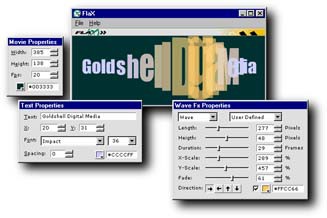
FlaX' WYSIWYG interface turns the creation of professional text effects into a matter of adjusting some sliders and pressing some buttons. FlaX' direct processing capabilities make sure that you never have to guess what your settings will look like: you are already looking at the result!
Any adjustment made takes effect immediately, which makes FlaX a productivity tool that you can't afford to miss out on. Creating high quality ShockWave material has never been so simple.
FlaX features
Each text effect has its own Fx Properties window. On this window you can find several "factory preset" effects in a dropdown list.
You also can find sliders and buttons to alter the effect to your own taste. Any change you make will be visible immediately, thus making it very easy to create your own effect variations.
You can "bookmark" any effect variation you made, and your effect will then get added to the "factory preset" effects, for future use. You can also export these bookmarks, and share them with others.
If you want to use other fonts in FlaX, simply download any TTF font, and install it on your computer. FlaX will automatically include it in its font list.
FlaX has many font coloration and styling options: solid letters, outline only letters, gradient coloration, etc.
With FlaX you can change the shape of your text. You can use shaping for all of the FlaX effects. See our shape samples page to see what this can do for your text effect..
Unlike several other text effects programs, the effects created by FlaX can be imported directly into Adobe Flash. This means that FlaX effects can be very easily integrated into your other Flash work.
Additionally, Goldshell has a free SWF editor called Clipyard, with which you can merge several FlaX effects into one new one.
Limitations
tags you can text effects flax effects which you your own sliders and factory preset can find preset effects many font your text font coloration text effect
Download FlaX 5.01

Purchase:  Buy FlaX 5.01
Similar software
FlaX 5.01
GoldShell Digital Media
FlaX comes equipped with 143 predefined effects, subdivided into 52 highly adjustable categories, which you can tweak using sliders and buttons, thus being able to create tens of thousands of unique effects.
 Pixifex 2.11
Goldshell Digital Media
Pixifex will create bitmap effects for Macromedia Flash, and does that real-time!
Pixifex comes equipped with 24 highly adjustable effects, which the user can tweak using sliders and buttons.
 Categories Search Plugin 1.0
Tweak Marketing Inc.
Categories Search Plugin is created to extract emails relating to specified search categories.
 Tweak FX 8.0 Beta
Georgi Smilyanov
Tweak FX is one of the most powerful tweaking tools for Windows.
 Win Tweak Manager 1.2.0.0
MalwareSweeper.com
Win Tweak Manager is the best utility for modifying system settings in the Microsoft Windows operating systems .
 ImagePlay 0.1.5
Tomis Erwin
ImagePlay is an open source application to run a series of effects on an image; tweak them, remove them, rearrange them, all without messing up the source image.
 XP Tinny Tweak 2.0.0
B.E.I.C. ELECTRONICS Inc
XP Tinny Tweak is a freeware software that has been developed to tweak up and remove spare components from your Windows operating system.
 RadicalPhoto 2.0.1
Radical Breeze
RadicalPhoto is the easiest application to enhance, tweak, convert or just goof around with your photos.
 M Tweak 1.0
Mohsen Ektefa
M Tweak is a small application designed to tweak and optimize your system.
 Advanced XP Tweak 2.52
Pingram Marketing
Do you work with Windows XP Professional or Windows XP Home Edition? Then, whether as a professional or an amateur you will certainly appreciate the Advanced XP Tweak software.

 RSS
RSS