zannoGrab 1.24
 zannoGrab is an easy-to-use screen capture program that makes it simple and easy to capture entire screens, active windows, or selected portions of the screen.
|

 14.00
14.00  Trial
Trial 0K
0K
 Windows Vista
zannoGrab is an easy-to-use screen capture program that makes it simple and easy to capture entire screens, active windows, or selected portions of the screen.
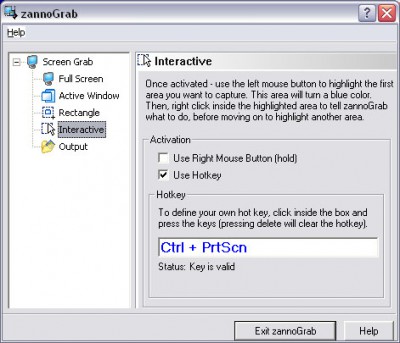
zannoGrab even has an "interactive" capture option that allows you to capture multiple areas of a screen in one session. Your captures can be saved into several popular graphics file formats including JPEG, PNG, TIFF, GIF, and BMP. zannoGrab was designed and written by a user as an easy and practical tool.
You can set four different "Hot Keys" for doing several types of captures. Having the application automatically name the destination folders and files helps you maximize productivity or you can name each capture yourself.
zannoGrab makes it really easy to quickly change the destination folder and file names between screen shots so every user can keep track of their work. At the same time, the option to name the file yourself at the time of capture insures that you will not lose track of it and lets you give each capture a descriptive name. And each time you do a capture, a handy sound effect plays so you know your capture was completed.
The "interactive" capture mode lets you take multiple captures in one session and gives you several options. Initiate the capture process and highlight an area you want to capture. Right-click and you get the option to take the capture, zoom in, zoom out, return to actual size, clear the selected area, or exit. Utilizing this mode you can, for example, move through a large document and capture various parts without ever totally leaving capture mode. You can also right-click and drag and zoom the screen in real time or click both mouse buttons and drag to get real time panning.
zannoGrab gives you exactly what you need to do screen captures and save them to graphics files. It's sister program, zannoTate, is perfect for annotating captures and inserting them in documents.
Limitations
tags you can click and right click the capture mode you and drag captures and real time gives you lets you name the one session interactive capture
Download zannoGrab 1.24

Purchase:  Buy zannoGrab 1.24
Similar software
zannoGrab 1.24
Zettatronic Software Solutions
zannoGrab is an easy-to-use screen capture program that makes it simple and easy to capture entire screens, active windows, or selected portions of the screen.
 Softoria Capture 1.0
Ahmed Elragi
Softoria Capture is a quick-and-easy screen capture utility for Windows, which allows you to capture the entire screen, at any color depth and resolution.
 GDS Screen Capture 1.0.0.6
GD Software Att. Brian Bergh
GDS Screen Capture is a simple to use Screen Capture tool.
 Amor Screen Capture 1.9.8
Amorsoft, Inc.
Amor Screen Capture is a tool for capturing any part of your screen.
 LS Screen Capture 1.0.2193
Linos Software
LS Screen Capture will capture your desktop in several handy ways.
 Capture My Screen 1.03
Namtuk
Capture My Screen is the best program for screen capturing.
 ScreenGrab 1.1
No Nonsense Software
ScreenGrab is a simple and effective screen capture tool for Windows.
 AnalogX Capture 2.01
AnalogX
Capture is a fast and simple screen capture tool for Windows OS (NT also), that will allow you to capture even the entire screen , at any color depth and resolution, and save it into a Bitmap file for editing.
 Print Screen Deluxe 7.0
American Systems
Print Screen Deluxe is the ultimate screen capture application.
 Capture-It! 1.0
DigiSoft, LLC
Capture-It! is a screen capture application with many features designed to improve your productivity.

 RSS
RSS