Startup Guru 2.2
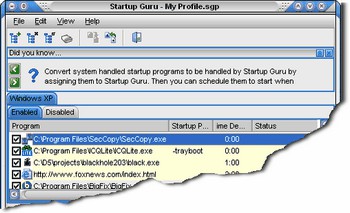
 Startup Guru will manage the application that load on your Windows computer each time it starts.
|

 19.00
19.00  Shareware
 0K
0K
 Windows Vista
Startup Guru will manage the application that load on your Windows computer each time it starts.
You can add, remove or temporarily disable any item. Great for removing adware/spyware or anything else that is slowing down your ability to get started using your computer!
The ability to schedule startup items is another handy feature. Many programs don't need to start right away, so setting them to start at a specific time after bootup helps to optimize the bootup process.
By spacing out the many programs that may be loading it will keep programs from fighting for your precious system resources all at once. Doing so allows you to access your computer faster! Startup Guru can also remove reoccurring entries from your system areas on boot up. If you have some type of adware/spyware that keeps inserting itself you can allow Startup Guru to remove the entry on bootup before it is accessed.
In the Advanced mode you can utilize Profiles to store bootup options. Create a profile for when you play games, one for when you're doing business, or any other specific need and assign it to load the next time you log in or boot up. Your system will load the assigned programs and you'll be off and running in no time!
Startup Guru features
tags startup guru adware spyware you can for when when you bootup options load the startup items temporarily disable your computer many programs your system
Download Startup Guru 2.2

Purchase:  Buy Startup Guru 2.2
Similar software
Startup Guru 2.2
Lincoln Beach Software
Startup Guru will manage the application that load on your Windows computer each time it starts.
 Startup Select 2.2
k.soft
Startup Select is a powerful Windows startup manager.
 Startup Control Center 2.11
Sureshot Software/Bysoft DATA
Startup Control Center lets you control which applications your computer executes when it starts up.
 Remove Startup Programs Buddy 2.2
Scorpio Software
Remove Startup Programs Buddy is a useful freeware application that will remove malicious programs from Windows startup.
 1st Startup Manager 1.0
1stdesktop.com
1st Startup Manager helps manage your startup applications and provides information on programs that run when you start up Windows.
 Startup Delayer 2.3 Build 115
r2 Studios
Can you learn another language in the time it takes for your machine to boot?
Do you turn on your PC when you go to bed, so it's finished booting by the time you get home from work the next day?
When Windows loads it's Startup file, it attempts to load every program in there at the same time.
 12Ghosts Startup 9.70
12Ghosts Inc.
12Ghosts Startup controls every program that runs at Windows startup.
 Simple Startup Manager 1.17
FilesWeb.com
When Windows starts it may automatically launch a number of additional programs.
 Custom StartUp 3.01
Goran Boban
Custom StartUp helps you to manage programs that are stared when windows starts, without need to edit registry or WIN.
 XP Startup Cleaner 3.92
XP-Tools
There are certain programs that you want to execute when your system starts.

 RSS
RSS