Remove Startup Programs Buddy 2.2
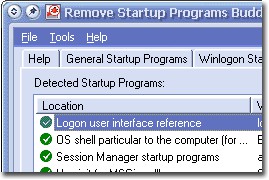
 Remove Startup Programs Buddy is a useful freeware application that will remove malicious programs from Windows startup.
|

 0.00
0.00  Freeware
 0K
0K
 Windows Vista
Remove Startup Programs Buddy is a useful freeware application that will remove malicious programs from Windows startup.
Remove Startup Programs Buddy inspects Windows startup places and lists startup programs so you could delete abusive items.
Remove Startup Programs Buddy backs up configuration data so you can roll back all changes at any time. Enjoy!
tags startup programs remove startup programs buddy windows startup
Download Remove Startup Programs Buddy 2.2
 Download Remove Startup Programs Buddy 2.2
Similar software
Remove Startup Programs Buddy 2.2
Scorpio Software
Remove Startup Programs Buddy is a useful freeware application that will remove malicious programs from Windows startup.
 Startup Select 2.2
k.soft
Startup Select is a powerful Windows startup manager.
 Autorun Cop 1.0
Mahaon soft.
Autorun Cop is a software created to control the Startup list where the programs that should be automatically launched when the system is started are specified.
 Startup Optimizer 1.6
Cyberlion
Cyberlion Startup Optimizer will inspect programs loading at Windows startup and keeps your PC running faster, cleaner, and error-free.
 Startup Guru 2.2
Lincoln Beach Software
Startup Guru will manage the application that load on your Windows computer each time it starts.
 RunViewer 1.02
DevelopEx
RunViewer is a simple application which helps you to see and disable programs your Windows and browser runs at startup.
 Startup Agent 2.1
KillerSoftware LLC
Startup Agent is a Windows 98/ME/XP/2000 product that provides constant monitoring of the startup areas during your Windows session.
 OnStart Pro 1.6
Spellway
OnStart Pro is a multi-user startup manager for Windows 2000/XP/2003 that allows you to control all programs that run on system startup.
 12Ghosts Startup 9.70
12Ghosts Inc.
12Ghosts Startup controls every program that runs at Windows startup.
 AutoStart 1.0
BlackBoard Software
Not all programs which start up are located in the startup folder.

 RSS
RSS