River Past Video Perspective 7.8
 Did you download some movie clip from the internet, and your video editor or DVD authoring software squeezed the wide screen to the regular 4x3 and everything look skinny?
Video Perspective is here to help.
Did you download some movie clip from the internet, and your video editor or DVD authoring software squeezed the wide screen to the regular 4x3 and everything look skinny?
Video Perspective is here to help.
|

 29.00
29.00  Demo
Demo 0K
0K
 Windows Vista
Did you download some movie clip from the internet, and your video editor or DVD authoring software squeezed the wide screen to the regular 4x3 and everything look skinny?
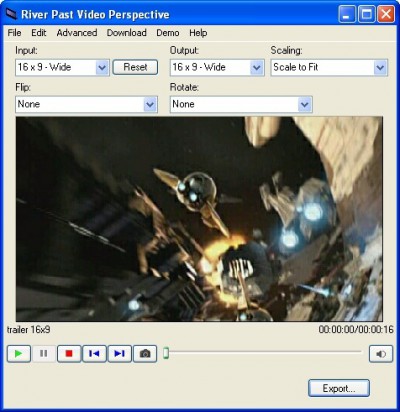
Video Perspective is here to help. It converts video to AVI or WMV for editing and streaming, and for AVI output, it gives you the options to change the aspect ratio of the video.River Past Video Perspective is a video converter with aspect ratio adjustment from AVI.
You can use Letter Box (black strips are added) or Pan & Scan (the original video is slided to fit in the new video).
Convert video from AVI, WMV, MPEG-1, MPEG-4, DIVX to AVI or WMV.
You can choose your video and/or audio codecs, video size, frame rate, audio sample rate, channel, and/or bitrate.
Clean up timecode in those bad video which causes crashes or AV sync problems in other software. No adware or spyware.
River Past Video Perspective features
River Past Video Perspective supports a wide range of input video file formats:River Past Video Perspective supports the following output formats:
Aspect Ratio:
Requirements
Limitations
tags pack required booster pack video perspective past video river past aspect ratio animated gif windows media you can the video and scan ogg media when using
Download River Past Video Perspective 7.8
 Download River Past Video Perspective 7.8
Purchase:  Buy River Past Video Perspective 7.8
Similar software
River Past Video Perspective 7.8
River Past
Did you download some movie clip from the internet, and your video editor or DVD authoring software squeezed the wide screen to the regular 4x3 and everything look skinny?
Video Perspective is here to help.
 Colorful Movie Editor 4.0
Colorful Software ltd;
Colorful Movie Editor is the simplest and fastest way to create compelling productions from raw video.
 FlexiMovie Composer 1.0
FlexiMusic.com
With FlexiMovie Composer you can produce your own movie or a slide show with your photos, video clips and voice recordings.
 Able Video Snapshot 1.19.5.6
GraphicRegion.com
Able Video Snapshot is an application that allows you take snapshots directly from your movie!
This means you can go to any point within a video clip, capture a freeze frame picture, and save this image to your computers hard drive.
 Clip Downloader 3.0
Kabware Developments
Clip Downloader is a content retriever, leech or Downloader that pulls contents from a given web server.
 i.Xchange Movie Editor v1.7.1
Channel Enterprises
i.
 Free Ultra Video Editor 3.1.0.0
Software Pile.com
Free Ultra Video Editor is a powerful Video Converter that converts MPEG-1, MPEG-2, AVI (Windows Video), WMV (Windows Media Video) and ASF to AVI and WMV and much more.
 Xilisoft DVD to iPod Suite 6.5.3.0310
Xilisoft Inc
Xilisoft DVD to iPod Suite is all-in-one easy-to-use DVD to iPod rip software, iPod music, iPod MP3 and iPod Movie converter.
 MPEG Video Wizard DVD 1.0
Womble Multimedia Inc
Womble MPEG Video Wizard DVD is the latest MPEG editor with DVD authoring and full AC-3 encoder support, and it includes all the features and functionality of its predecessor --- the MPEG Video Wizard.
 Plasmaplugs Scroll Bar 2.0
plasmaplugs
You can use the Scroll Bar component for scrolling any movie clip content (text, images, swf's etc).

 RSS
RSS