QuickFolders 3.5.0
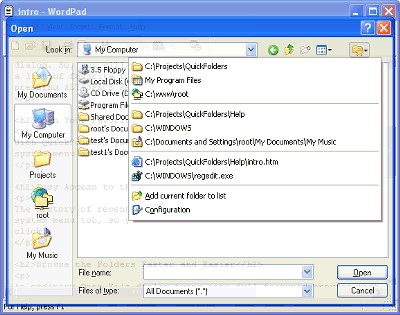
 QuickFolders adds its menus into the standard system menu of Open or Save File dialog.
|

 19.00
19.00  Trial
Trial 0K
0K
 Windows Vista
QuickFolders adds its menus into the standard system menu of Open or Save File dialog. So, you will see a list of recently visited folders and opened or saved files and a list of favorite folders just right-clicking in any place of dialog's title bar or pressing ALT+SPACE keys.
QuickFolders also adds a special button into the Open and Save File Dialogs. Click this button to gain the access to QuickFolders' menus. You can access this menu within both Standard Windows and MicrosoftR Office family Open and Save dialogs.
With QuickFolders you can create a list of the favotite folders that will be kept in the system menu and will be available in a one mouse click. The history of recently visited folders and opened or saved files will be placed in the system menu too, so you will be able to open last visited folder or open a file in one click.
An ordinary Open File dialog turns into full-featured browser with the help of QuickFolders. You can use all power of IntelliMouse Explorer compatible mice in these dialogs: just click Back and Forward button of your mouse to browse visited folders. If you do not have IntelliMouseR Explorer compatible mouse, you can use keyboard shortcuts or use emulation of Back and Forward buttons with an ordinary ones.
QuickFolders will help you to customize Windows and Microsoft Office family Places bar. QuickFolders will make Open and Save File dialogs transparent, so they will not consume screen space anymore. You will be able to see the contents of the file you are working with or what the program do when you are opening a file.
Turn those old boring Open and Save File dialogs into the power tool that helps, using lots of QuickFolders options!
Limitations
7 day free trial
tags you can open and and save save file into the file dialogs system menu visited folders you will back and explorer compatible can use and forward
Download QuickFolders 3.5.0

Purchase:  Buy QuickFolders 3.5.0
Similar software
QuickFolders 3.5.0
ByteGems.com Software
QuickFolders adds its menus into the standard system menu of Open or Save File dialog.
 Direct Folders 3.71
Code Sector Inc.
Waste lot of time while opening and saving files?
Direct Folders will allow you access most recent and favorite folders directly from the standard File Open and File Save dialog boxes, as well as Explorer, WinZip and WinRAR.
 Magic of recent documents
AMK Software
This program allows the users fast to find and to open recent documents.
 Dialog Box Assistant 2.1
Duality Software
Dialog Box Assistant greatly speeds up access to your data.
 About Menu 1.0.1
Scott Earleywine
About Menu is a Firefox/ Mozilla suite extension that adds an additional menu item to the current list of menus.
 FolderJump 1.5
Leonid Belousov
The Master Cluster's FolderJump is a simple and handy extension for the standard context menus of Windows Explorer and Open/Save Dialogs.
 XFilesDialog 4.00
XDESKSOFTWARE
XFilesDialog is an application that will resize the Windows and Office file dialogs (open, save, save as) and will add a list of favorites and recent files/folders.
 FileMenuHandler 1.0
Xarka Software
FileMenuHandler is a component for handling Recent files list and Open, Save, Save As, Exit Commands.
 PS Hot Folders 2.2
PS Soft Lab
Using PS Hot Folders special easily configured menu, you can quickly go to the folder that you want in standard Windows Open, Save As and Browse dialogs (Microsoft Office dialogs are supported too) or quickly open the folder that you need in Windows Explorer.
 Tracks Eraser 5.1
Acesoft
Tracks Eraser - Surf the Web with the stealth and anonymity.

 RSS
RSS