PS Hot Folders 2.2
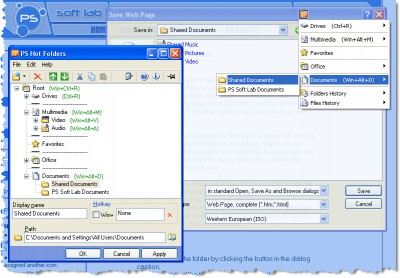
 Using PS Hot Folders special easily configured menu, you can quickly go to the folder that you want in standard Windows Open, Save As and Browse dialogs (Microsoft Office dialogs are supported too) or quickly open the folder that you need in Windows Explorer.
|

 19.00
19.00  Trial
Trial 0K
0K
 Windows XP/Vista
Using PS Hot Folders special easily configured menu, you can quickly go to the folder that you want in standard Windows Open, Save As and Browse dialogs (Microsoft Office dialogs are supported too) or quickly open the folder that you need in Windows Explorer.
PS Hot Folders is also able to save your history of Open and Save As dialogs.
The above operations are carried out through the menu that can be called by clicking the special button in the dialog caption or the program icon in the taskbar system tray, and also by pressing user assigned hot keys (support for the key significantly extends the number of possible combinations).
The list of folders can be shown as a tree, that is you can divide all the folders that you want to open into logical groups which make it easier and quicker to find the folder that you want now. This grouping will allow you to form a very handy structure of the folders that you open most often. Using the structure, you can very quickly find and open the folder that you want now.
PS Hot Folders features
Limitations
tags the folder that you folder that you want hot folders you can the menu the folders folders that want now hot keys fast access clicking the
Download PS Hot Folders 2.2

Purchase:  Buy PS Hot Folders 2.2
Similar software
PS Hot Folders 2.2
PS Soft Lab
Using PS Hot Folders special easily configured menu, you can quickly go to the folder that you want in standard Windows Open, Save As and Browse dialogs (Microsoft Office dialogs are supported too) or quickly open the folder that you need in Windows Explorer.
 Folder Express 2.1
Huang He
Folder Express allows you instantly jump to your frequently used folders in Windows Explorer, Open/Save File dialogs, folder windows or Browse Folder dialogs.
 Folder Pilot 1.00
BAxBEx Software
Folder Pilot seamlessly integrates into your Windows environment with two easy-to-use Windows extensions.
 Manage Folder Now 2.0
Elongsoft Software
Manage Folder Now allows you to hide folder or quick jump your folders.
 ABF Favorite Folders 1.31
ABF software, Inc.
ABF Favorite Folders will allow you to easily store, manage and access a list of frequently used folders.
 Special Folder Creator 1.0.0
Poromenos
Special Folder Creator will allow the user to create folders like Dial Up Networking, Printers, Control Panel, Recycle Bin anywhere you want.
 Folder View 2.1
MediaVilla
Folder View is an add-on for Windows that drastically enhances the way you browse the folders on your system.
 Access Folders 2.11
Shelltoys Inc.
Access Folders is a fine Windows enhancement that keeps all of your directories and sub-directories within easy reach.
 EfreeBuy Folder Icon 3.00
EFREEBUY
EfreeBuy Folder Icon will allow the user to have the same icon for all the folders on the computer, making every folder different.
 My Folders 1.2
nabocorp. softwares
Tired of double-clicking in Explorer windows to access the same folders every time? You put some shortcuts on your desktop but they take too much space and are not accessible when you are running an application? Then My Folders is for you!
My Folders allows you to define a keyboard shortcut that you can activate at any time, whatever the application you are running is.

 RSS
RSS