PMView Pro 3.81
 PMView is a robust and configurable image viewing, conversion, and editing tool for bitmapped graphics.
|

 39.00
39.00  Trial
Trial 0K
0K
 Windows Vista
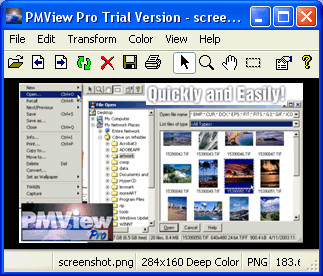
PMView is a robust and configurable image viewing, conversion, and editing tool for bitmapped graphics. It loads your images blazingly fast, without compromising quality or robustness. PMView supports saving and loading of more than 40 different file formats, including JPEG, GIF, PNG, TIFF, and PhotoCD.
PMView Pro is a software that view, convert and edit bitmap images.
PMView offers broader and faster support for these file formats than many other programs do, since we wrote all of PMView's code for format handling ourselves. PMView also incorporates various image recovery techniques. If the image is bad, PMView will try to make the best of the situation and show the image if only possible. It does not give up easily.
PMView is intelligent. It tries to figure out what you want instead of popping up meaningless error messages. It tries to provide good default settings for most actions. PMView is also very configurable.
There are hundreds of different options that make it possible for you to configure PMView to your liking. For instance, PMView has fully configurable shortcut keys.
PMView is much more than a viewer. It has functions for doing screen captures including the unique feature to capture parts of a window that are outside the desktop. The print function in PMView is a true WYSIWYG (what you see is what you get) implementation that visually lets you adjust margins and see the printed output.
PMView allows for printing an image using multiple sheets of paper, enabling the user to print out a huge poster using standard letter sized paper and gluing the parts together. Naturally, PMView also has a TWAIN-interface for scanning and advanced batch and scripting functions that lets you automate conversion of a large number of files in the background.
PMView has a unique automatic thumbnailing facility that will create thumbnails for your images. The thumbnails in the file open window make it possible for you to browse through hundreds of images in minutes. You'll never again have to load a bunch of images just because you forgot the name of the one you're looking for.
PMView lets you convert files from one file format to another with the click of a mouse button. Just right-click with your mouse on the file you want to convert and select what format to convert to. PMView will do the conversion in a background task and lets you continue working.
PMView also has an easy-to-use slideshow feature that lets you create slideshows just by dragging and dropping the images you want. The slideshow controller gives you an easy way to control your slideshow while it's running.
PMView is written in C++ and makes heavy use of C++ specific features like classes, templates and exception handling. Throughout this product, we have tried our hardest to provide you with the best possible performance.
Our memory and file management routines will provide you with blazing speed and the best use of your hardware. PMView does not lay its foundation on third party code or libraries that would limit our possibilities to provide a robust and optimized solution.
PMView is dynamically multithreaded, meaning that threads will be created and destroyed as needed. There will never be threads spinning in the background doing nothing. We have also invented a Priority Boost system that will let you use idle time priority without having to worry about locking up PMView or your system. PMView works well on single CPU systems, but also includes advanced SMP features for multi-processor systems.
PMView Pro features
Access EXIF Image InformationConvert Dialog
QuickScript Utility
Confirm File Replace Dialog
Requirements
Limitations
tags lets you with the the file your images you can the best what you pmview also pmview pro you want file open the new provide you
Download PMView Pro 3.81

Purchase:  Buy PMView Pro 3.81
Similar software
PMView Pro 3.81
Peter Nielsen
PMView is a robust and configurable image viewing, conversion, and editing tool for bitmapped graphics.
 Ameri-Imager 2.0
ThinkTank Software
Ameri-Imager is a strong all-in-one software you can use for image conversion, editing, viewing and much more.
 Drag And View 4.5.1
Canyon Software
Drag And View is a program that can view the contents of word processors, databases, spreadsheets, bitmapped and vector graphics.
 IceView 4.01
Mithril Software
IceView is developed as a versatile graphics utility for the Windows environment.
 TGATool2 4.00.32
MW Graphics
TGATool2 - A Tool for the viewing, converting and editing of Targa and Ace Textures
Initial attempt at a standalone program for working with the Bmp.
 TStealthPanel 1.0
Sergey Tkachenko
TStealthPanel is a panel which can hide itself and show only inserted controls; designed for inserting group of controls into RichView with bitmapped background.
 Right GIF Converter 1.3
RightFiles.com
Right GIF converter was designed to combine image editing with image conversion to GIF file type.
 Turbo Browser 11.5.00206
FileStream, Inc.
Turbo Browser includes a set of Web design tools for graphics and HTML and code editing.
 ImageWalker 2.31
ImageWalker
ImageWalker is an application that simplifies the process of editing, viewing, thumb nailing, organizing and publishing digital images.
 CDH Image Explorer Pro 7.2
CDH Productions
Image Explorer Pro is the most complete, all-in-one image and video solution currently available.

 RSS
RSS