NeoPaint 5.3.0a
 NeoPaint is a powerful 32-bit Windows paint/image/photo editor.
|

 49.00
49.00  Trial
Trial 0K
0K
 Windows Vista
NeoPaint is a powerful 32-bit Windows paint/image/photo editor. It supports Animated GIF, JPEG, BMP, ICO, PCX, TIF and more.
NeoPaint is a full featured artist's studio for Windows that's easy-to-learn, powerful and affordable! It's simple enough for beginners yet packed with powerful features and advanced tools.
NeoPaint makes it easy for business and home users to touch up photographs and create great looking graphics for desktop publishing, presentations and the Internet!
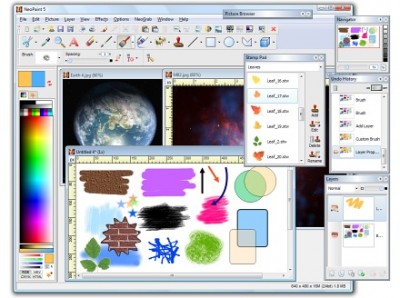
Includes many paint and photo retouching tools, natural media and custom brushes, 2D/3D shapes, soften, sharpen, red-eye, special effects, masking, textures, color separations, stamps, multi-level undo, rulers, grids, gradients, image browser, screen capture and more.
Painting and Drawing Tools - Brush, Airbrush, Highlighter/Magic Marker, Charcoal, Crayon, Chalk, Watercolor, Oil, Quill Pen, Custom Brushes, Eraser, Color Eraser, Flood Fill, Tile Fill, Gradient Fill, Color Replacement Fill, Text, Line, Bezier Line, K-Line, Color Sampler, Smudge, Blend, Sharpen, Soften, Sponge, Clone, Red-Eye Removal, Multi-Level Zoom, Patterns, Rectangles, Ellipses, Polygons, 3D shapes and more.
Multi-Level Undo/Redo - Powerful undo/redo feature keeps track of multiple changes made to your pictures.
Stamp Pad - Quickly assemble pictures using collections of clip art and stamp images. Create, edit, rename and delete stamps. Stamp images may even be used as custom multi-colored brushes.
Selection Tools: Rectangle, Ellipse, Polygon, Freehand, Fill and Color selection with Transparent, Solid, and Edge Blending options.
Special Effects and Textures - Blur, Erode, Sharpen, Soften, Noise, Antialias, Impressionism, Pen & Ink, Pointillism, Mosaic, Border, Buttonize, Vignette, Auto Trim, Fade, Halftone, Posterize, Solarize, Blend, Emboss, Lattice, Motion Blur, Pixelize, Screen, Smoked Glass, Streak, Wirlpool, Wave, Acid Wash, Cameo, Crystallize, Texture Melt, Toxic Rain and Vaporize. Textures: Brick, Burlap, Canvas, Cast Iron, Clouds, Coral, Crumpled Paper, Denim, Dirt, Fire, Grease, Leather, Marble, Matting, Melted Plastic, Oatmeal, Plasma, Sand, Sponge, Stucco, Thick Paint, Tile, Water, Wood and more.
Color Control - Works with 2, 16, 256, grayscale and 16 million color images. Custom Palettes, Color Balance, Color Similarity, Brightness, Contrast, Hue, Saturation, Color Reduction/Conversion, Color Separation/Combining, Gamma Correction, etc.
Screen Capture - Integrated NeoGrab utility that makes creating screen shots for manuals, training, newsletters and web sites fast and easy. A variety of capture methods make it simple to get just the portion of the screen you want.
Picture Browser - Integrated Picture Browser can be used to display thumbnail previews of an entire folder of image files. Additionally, previewed files may be opened, copied, moved or deleted using the included file management tools.
Scanner Support - Provides direct access to most TWAIN compatible scanners and digital cameras.
Printing - Excellent printed output to any Windows compatible black and white or color printer! Print preview allows exact placement and sizing. Print crop marks, CMYK separations, and more.
Internet/Web support - Create and edit Animated and Transparent GIF images. Use the GIF and JPEG optimization functions to reduce file size. The "Load from the Web" option can load images into NeoPaint using an Internet URL address.
Requirements
Limitations
tags and more multi level undo redo stamp images windows supported picture browser sharpen soften level undo custom brushes red eye special effects screen capture
Download NeoPaint 5.3.0a

Purchase:  Buy NeoPaint 5.3.0a
Similar software
NeoPaint 5.3.0a
NeoSoft Corp
NeoPaint is a powerful 32-bit Windows paint/image/photo editor.
 AZ Paint & Animated GIF Editor 6.0.0
Herman Compute
AZ Paint & Animated GIF Editor is a compact Paint program and Animated GIF Editor.
 AZ Paint Pro, Icon Editor & Animated GIF Editor 7.0.0
Herman Compute
AZ Paint Pro is a graphics application combining (i) Icon Editor, (ii) Animated GIF Editor and (iii) Paint in a single program, hence it is called "AZ Paint Pro, Icon Editor & Animated GIF Editor".
 VCW VicMan's Photo Editor 8.1
VicMan Software
VCW VicMan's Photo Editor is a smart image editor with an intuitive interface and a wide variety of features.
 EasyPicture 4.2.0
Jean de Virieu
EasyPicture is designed to be a simple but powerful photo editor.
 JPEG Viewer 0.12
HMK Research
JPEG Viewer is a free and useful image viewer and editor.
 Brush Strokes Image Editor 1.0
Paul Bird
Free paint program - graphics editor - photo manipulator - bitmap editor - or whatever else you want to call it.
 GraphicsGale 1.83
HUMANBALANCE Co
GraphicsGale is a software for editing raster format image.
 Ultimate Paint 2.88
Megalux
Ultimate Paint is a full-featured 32-bit Windows graphics program for image creation, viewing and manipulation.
 Easy Photo Editor 1.8
JKLNSoft.com
Easy Photo Editor gives you an easy-to-use image-editing application.

 RSS
RSS