EasyConsole 1.2
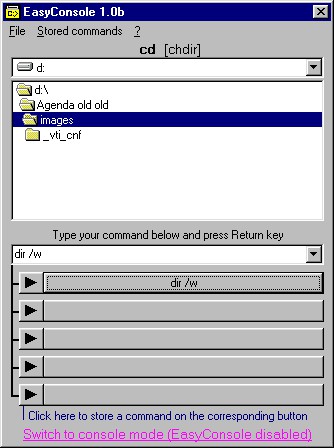
 EasyConsole Dos shell utility will let you navigate in drives and through folders using Windows issuing DOS commands on a slave MSDOS console, saving command-line instructions for future use.
|

 15.00
15.00  Shareware
 0K
0K
 Windows Vista
EasyConsole Dos shell utility will let you navigate in drives and through folders using Windows issuing DOS commands on a slave MSDOS console, saving command-line instructions for future use.
Last 20 commands are memorized and you will be able to store 10 long most used or favorite command lines on 10 buttons to be launched with a click instead of typing again and avoiding fastidious repetitive commands.
You may also type long DOS instructions with their parameters and memorize them (not only internal MSDOS commands) as well as launch your DOS Batch programs, for example run Rebol command-lines or any exe with its variables, in MSDOS batch NT tasks or other Windows systems.
Language: English
Requirements
Windows 32
Download EasyConsole 1.2

Purchase:  Buy EasyConsole 1.2
Similar software
EasyConsole 1.2
Soft Experience
EasyConsole Dos shell utility will let you navigate in drives and through folders using Windows issuing DOS commands on a slave MSDOS console, saving command-line instructions for future use.
 Shell Places Bar Editor 1.00
Flexigensoft.com
With Shell Places Bar Editor is a free utility with the help of which you can easyly change buttons on places bar in shell open and save dialogs.
 EasyClip 2.0
FlashPeak.com
EasyClip is a slim suite of utilities on clipboard enhancement, shell enhancement and computer automation.
 AB Commander XP 6.95
WinAbility Software Corporatio
AB Commander is a powerful yet easy to use utility that lets you manage your files and folders using the convenient dual-panel user interface (pioneered in Norton Commander), while maintaining close integration with the standard Windows shell.
 Drives 1.04
Paul Scott
Drives utility runs in the system tray, and displays a list of all current drives.
 PowerPro 4.7
Bruce Switzer
PowerPro supplements the Windows shell with rapid, minimal-mouse click access to your most used commands while taking up little system resources, and to provide utilities related to Windows start-up and time.
 Command Creator 3.0
jiiSoft
Command Creator will help you create run-commands for use in the Start Menu´s Run dialog.
 Handy Folders 3.5.0.877
Resort Labs
Handy Folders - there are thousands of folders on your disks that are used by Windows and third-party software.
 Drag and Drop Robot 1.15.01
DonationCoder.com
Drag and Drop Shell Robot is a tool to help power users easily peform operations on large numbers of files and folders.
 Fast Folder & Command 1.0
Wpg Software Inc.
Fast Folders is a shell enhancement which will give you rapid access to your most used folders in Common Open/Save dialogs, the desktop and in Explorer.

 RSS
RSS