Dust 1.7
 Direct User Switching Task (DUST) extends this functionality by providing the ability to switch directly to another user session, via a hot key, without going through the Windows XP/Vista welcome screen.
|

 12.00
12.00  Shareware
 0K
0K
 Windows XP/Vista
Direct User Switching Task (DUST) extends this functionality by providing the ability to switch directly to another user session, via a hot key, without going through the Windows XP/Vista welcome screen.
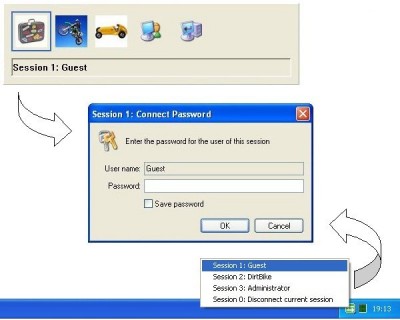
This uses a popup menu of icons in a similar style to Alt+Tab task switching (including using the Shift key to reverse the selection direction). The benefits this task provides over standard Fast User Switching are as follows:
Can switch directly to another user session via a hot key without going through the Windows XP/Vista welcome screen.
An option to switch directly to another session via a menu off a notification area icon (useful for tablet computers).
Allows user switching when the Windows XP welcome screen has been turned off for the classic logon prompt.
Allows user switching when the Windows XP computer is a member of a domain.
Can optionally save passwords and automatically logon on with them.
The default hot key is WinKey+S, but during installation a different key combination can be chosen. This can involve any combination of WinKey, Alt and Control (but not Shift) as the key (or keys) that need to be held down whilst another key is pressed to access the popup menu.
The rest of this documentation refers to the chosen combination that needs to be held down as the DustKey. The Direct User Switching Task runs in every user session and provides the functionality to switch away from the current user.
Hence immediately after installation the task will not be running in existing sessions until the user logs out and logs back in again (or the task is explicitly started from its installation directory).
The following screen shot shows the popup menu where repeated pressing of the hot key (whilst the DustKey is held down) causes the next item in the list to be selected.
The first item will disconnect the current session and the last item will simply cancel the popup (as will DustKey+Esc). All intermediate items will have the picture for the appropriate user of that session (if available) and when selecting the item the session number and user name will be displayed.
Dust features
Limitations
tags user switching hot key the windows welcome screen held down the popup direct user popup menu switching task user session session via switch directly for the
Download Dust 1.7

Purchase:  Buy Dust 1.7
Similar software
Dust 1.7
Way Beyond Computing Ltd
Direct User Switching Task (DUST) extends this functionality by providing the ability to switch directly to another user session, via a hot key, without going through the Windows XP/Vista welcome screen.
 R-WIN 2000 Keyboard Switch 6.0
Proxima Software
R-WIN 2000 Keyboard Switch - keyboard extension utility for users working with two or more input locales at the same time (for example, English, German, Russian, .
 ROFUS 1.00
db90h
Windows provides the ability to start specific program on initial login, but not when switching between already logged-in users.
 WinSU 1.0
SysDevSoftware
WinSU - Command-line utility to switch from privileged to non-privileged user account with no password.
 Icy-TV 1.1
CREEO
Icy-TV software will turn your computer into a high performance television receiver and recorder in just a few moments providing a robust set of intuitive features.
 Language Switch 2.1.9.0
MicroTools4u
Language Switch gives you the possibility of system language switching between all that your system supports.
 OneFinger Task Switch 1.1.0.0
ACQSOFT
OneFinger Task Switch helps you to switch between open applications more convenient and easy, just one finger/touch on keyboard.
 Net Profile Switch 7.0
JitBit Software
JitBit Net Profile Switch allows storing and switching between two or more network configurations.
 eXtended Task Manager 2.15
Warecase
The Warecase eXtended Task Monitor (XTM) is a powerful auxiliary tool designed for simplifying the environment of the software developer.
 Scry 4.22
MH Software
Scry is a desktop IN-AND-OUT board, providing an instant reference of who's in or out of your organisation.

 RSS
RSS