Amazing Slow Downer for Windows 3.2.3
 Amazing Slow Downer - if you are a musician who likes to learn new songs and techniques by listening to the same piece of music over and over but wish that the music could be played a little slower, then you will enjoy Amazing Slow Downer.
|

 44.00
44.00  Trial
Trial 0K
0K
 Windows Vista
Amazing Slow Downer - if you are a musician who likes to learn new songs and techniques by listening to the same piece of music over and over but wish that the music could be played a little slower, then you will enjoy Amazing Slow Downer.
Amazing Slow Downer for Windows is a program that will help you to learn new songs.
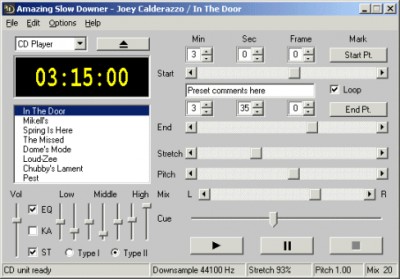
Slows down the speed of the music - between -50% and 400% time-stretching without changing the pitch.
Wrong key? Change the pitch in semi-tones - at full or lower speed.
Out of tune? Adjust the pitch in cents (100ths of a semi-tone) to suit your instrument.
Real-time processing - all described above is done in real-time - just insert the CD and press the play button!
Also slows down MP3, Wave, Windows Media Audio, Ogg, FLAC and AAC/M4A files on your computer in real-time.
Note: M4P files from the iTunes store is not supported.
Great stereo sound quality!
You can repeat any section of the music at full speed, slow it down or even speed it up by stretching the music by -50% to 400% without changing the pitch! You can also change the pitch up or down in semi-tones or fine-tune in cents (100ths of a semi-tone) to suit your instrument.
Amazing Slow Downer works with your CD-ROM drive or any MP3 / Wave file on your harddisk and does all processing in real-time - no time wasted on recording or processing!
Requirements
Limitations
tags the pitch real time the music amazing slow slow downer suit your your instrument mp3 wave the first you can semi tone change the new songs
Download Amazing Slow Downer for Windows 3.2.3
 Download Amazing Slow Downer for Windows 3.2.3
Purchase:  Buy Amazing Slow Downer for Windows 3.2.3
Similar software
Amazing Slow Downer for Windows 3.2.3
Roni Music
Amazing Slow Downer - if you are a musician who likes to learn new songs and techniques by listening to the same piece of music over and over but wish that the music could be played a little slower, then you will enjoy Amazing Slow Downer.
 MidiNotate Musician 1.1.6
Notation Software Inc
MidiNotate Musician is a tool that converts MIDI files to sheet music.
 NSA Song Player 1.22
NSA Software
The NSA Song Player is designed to help you learn and create songs for the guitar.
 BestPractice 0.98
Robert Moerland
BestPractice is a tool to slow down or speed up music, either from a wave file or directly from a CD.
 LyricWiki 1.0.1
Luminescence
LyricWiki is a software application that will display lyrics of songs you are listening.
 Riffster 2705
Polarity
Riffster is the musician's favourite practice tool.
 Amazing Grace 1.0
anaja
Amazing Grace is a free christian theme.
 AudiStream Plus 0.400
Adam Parker
AudiStream is a simple and very quick way to tell others what songs you are listening to.
 TabTrax 2.0 beta
2112design Inc
TabTrax - instantly convert any drum tab to standard sheet music notation and playable MIDI music.
 ABX-Player 1.0
Timo Esser
This software allows you to do a double blind listening test by playing two or three synchronised stereo tracks (A, B and X) and switch between them to compare and listen for differences.

 RSS
RSS