ACD mPower Tools 1.0.2
 ACD mPower Tools extends the digital imaging features of Microsoft® Windows®.
|

 49.00
49.00  Shareware
 0K
0K
 Windows Vista
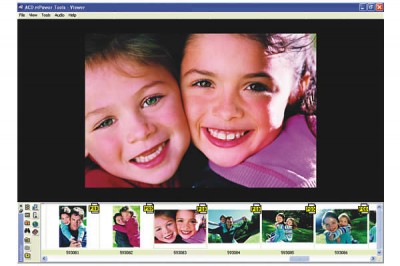
ACD mPower Tools extends the digital imaging features of Microsoft® Windows®. Save hours with at-a-glance metadata and thumbnail views in Windows of Canon Raw, PSD, Kodak Photo CD, AOL ART and over 40 more formats not normally supported. Find and drag files into Photoshop® fast. Get previews and batch editing with a right-click.
View more picture and graphic formats. See and sort on additional metadata details. Preview video, audio and images. Plus, you can share, print and batch edit with a right click. Find and grab media for other programs fast.
Photoshop users will love the media bar for quickly finding pictures and dragging them into Photoshop or other programs.
Photographers will speed their workflow - viewing and sorting by camera metadata in Windows and seeing thumbnails for 50 professional formats including over 40 not normally supported in the operating system such as Canon Raw, PSD and Kodak Picture CD.
Windows users will find it a snap to work with images, sound and movie clips. With the handy right-click menu, just click for quick previews of video, photos and sound, for a fast graphics converter and to edit batches of images and share them.
ACDSee users will love the right-click access to their favorite ACDSee features and plug-ins in ACD mPower Tools. Plus, ACD mPower Tools can share the ACDSee 5.0 image database for an integrated working environment.
ACD mPower Tools photo imaging software lets you think less about what program to use and more about your images, video and audio.
tags right click acd mpower mpower tools users will can share will love love the other programs find and canon raw raw psd not normally normally supported
Download ACD mPower Tools 1.0.2
 Download ACD mPower Tools 1.0.2
Purchase:  Buy ACD mPower Tools 1.0.2
Similar software
ACD mPower Tools 1.0.2
ACD Systems
ACD mPower Tools extends the digital imaging features of Microsoft® Windows®.
 Windows Imaging Component RC1
Microsoft Corporation
The Windows Imaging Component supports discovery of new and proprietary (e.
 PDF+ IFilter 2.0
IFilterShop
PDF+ IFilter is an enhanced IFilter for Adobe PDF files.
 Microsoft Photo Info 1.0
Microsoft
Microsoft Photo Info will allow photographers to easily add, change and delete common "metadata" properties for digital photos from inside Windows Explorer.
 XMP IFilter 2.0
IFilterShop
XMP IFilter lets you index and search JPEG, PS, EPS, PSD, GIF, TIFF, PNG, AI and SVG files.
 Imaging Express 1.4.6
Vixelsoft
Imaging Express - A low cost image viewer and editor specially designed to handle document imaging for Windows XP, with the ability to read and save multi-page scanned documents in TIFF or PDF, supports over 30 other formats.
 PhotoUtil 1.1
Sergej Marsnjak
PhotoUtil software helps with managing of digital photographies.
 Photo-Suit Professional 4.0.27
Photo-Suit.com
Photo-Suit is a photo edit tool which will provide an easy method for creating professional digital imaging results.
 !Glance 2.30
BlackSoftware
!Glance allows you to capture selected screen regions, windows, menu, buttons, toolbars or video frames and save them as BMP, GIF, or JPEG files.
 Exifer 2.1.5. Build 263
Friedemann Schmidt
Exifer is a nearly free software (you only should send me a postcard if you're using Exifer frequently) with which you can manage the metadata (EXIF/IPTC) of pictures taken by digital cameras.

 RSS
RSS