XXCLONE 2.08.8
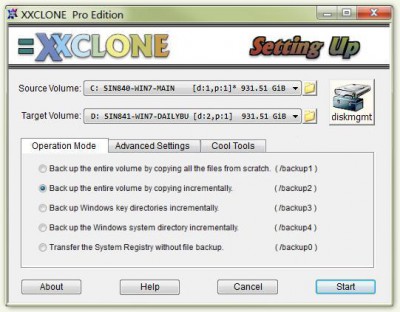
 XXCLONE duplicates the whole Win NT, 2 or XP system volume to another volume that will become ready to boot without a restore step.
|

 0.00
0.00  Freeware
 0K
0K
 Windows XP/Vista
XXCLONE duplicates the whole Win NT, 2 or XP system volume to another volume that will become ready to boot without a restore step. You may boot the system from the clone volume by simply swapping the disks when a disaster strikes.
The cloned volume may be larger than the source volume, or even smaller as long as the volume data can fit. You may copy from FAT to NTFS or vice versa. XXCLONE supports PATA, USB-disk and SATA. Ideal for periodic backup, or a one-time disk upgrade, or migration.
Unlike the disk imaging tools, XXCLONE copies files and directories. Therefore, you stay in Windows and may do some work while the cloning runs in the background. With a full volume backup, files in the target volume will always de-fragmented automatically without the need for the time-consuming de-frag on the source.
XXCLONE maintains Restore Points with most recent 7 daily, 4 weekly, 12 monthly and 5 yearly records with which you can restore the exact state of the system registry.
Additional features include tools to duplicate the Volume ID, to repair non-bootable disk, and more. It supports command line arguments and suits batch file invocations, also.
Extremely easy to use with user-friendly GUI.
Requirements
tags disk and the volume the source the system you may
Download XXCLONE 2.08.8

Similar software
XXCLONE 2.08.8
Pixelab, Inc.
XXCLONE duplicates the whole Win NT, 2 or XP system volume to another volume that will become ready to boot without a restore step.
 Pepsi Volume Controller 3.0
Fazihuzzamaan
Pepsi Volume Controller (PVC) has all features of the traditional Windows Volume Control and some other interesting features.
.jpg "3RVX (formerly 3r1c) 1.0.4") 3RVX (formerly 3r1c) 1.0.4
3RVX (formerly 3r1c) 1.0.4
Matthew Malensek
3r1c is a free and useful volume notification/control tool which emulates the volume bezel of Mac OS X.
 VolumeTray 2.0
GlorySOFT
VolumeTray is a little utility that allows you to adjust volume by
two ways:
- by clicking with your left or right (volume up/down) mouse button on the
icon in the system tray
- through assigned system wide hot keys
VolumeTray is a tool that allows you control your volume.
 Sound Volume Hotkeys 1.1
Softarium.com
Sound Volume Hotkeys - Control sound volume using system-wide hotkeys.
 hd-dvd volume key finder 1.0
Ape
hd-dvd volume key finder grab the volume key from windvd memory.
 Fast Volume 1.2b
Digital Fantasy
Fast Volume is an easy-to-use utility, which allow you to change volume level very fast.
 VolumeKeys 1.0
Airbear Software
VolumeKeys is an easy to use application in which you assign special key combinations, called VolumeKeys, to volume-related actions such as muting the volume or increasing the volume by 10%.
 Volume Hotkey XP 2.0
Thomas Bigler
 NTFSInfo 1.0
Mark Russinovich
NTFSInfo is a little applet that shows you information about NTFS volumes.

 RSS
RSS