XP Context Tools 1.1.1
 Add useful utilities to My Computer and Explorer Context Menu
XP Context Tools is a collection of useful tools added to Windows Explorer context menu used by Camtech on a daily basis.
Add useful utilities to My Computer and Explorer Context Menu
XP Context Tools is a collection of useful tools added to Windows Explorer context menu used by Camtech on a daily basis.
|

 0.00
0.00  Freeware
 0K
0K
 Windows XP/Vista
Add useful utilities to My Computer and Explorer Context Menu
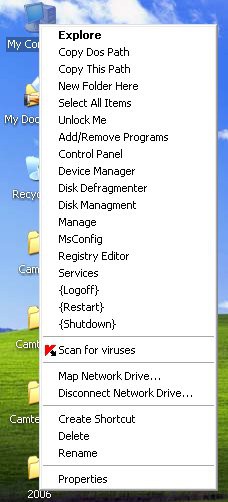
XP Context Tools is a collection of useful tools added to Windows Explorer context menu used by Camtech on a daily basis. This adds 2 new items to the 2 existing ones. Choosing "Custom" during the installation will let you specify which one you want to add and "Typical" adds them all. Items can also be added or removed at any time by choosing "Change" or "Modify" in the Add/Remove Programs or running the installer again.
Items XP Context Tools Adds:
Copy This Path
Copies Windows file or folder path to the clipboard
(C:Program FilesCamtechSpyware InoculatorSpywareInoculator.exe)
Copy Dos Path
Copies Dos file or folder path to the clipboard
(C:Progra~1CamtechSpywar~1Spywar~1.exe)
New Folder Here
Creates a New Folder anywhere with one click
Select All Items
Select all Files and/or Folders in a Directory
Move To Folder
Move all Selected items to an existing folder or create a new one on the fly
Copy To Folder
Copy all Selected items to an existing folder or create a new one on the fly
The utility "Add Your Own" enables you to add any application you choose to My Computer's context menu.
For Windows XP only add these items to My Computer:
tags context menu all selected select all selected items new one the fly new folder existing folder folder path all items context tools add remove remove programs
Download XP Context Tools 1.1.1
 Download XP Context Tools 1.1.1
Similar software
XP Context Tools 1.1.1
Camtech 2000
Add useful utilities to My Computer and Explorer Context Menu
XP Context Tools is a collection of useful tools added to Windows Explorer context menu used by Camtech on a daily basis.
 Context ThumbView 1.8.6
ContextMagic.com
Context ThumbView is a Windows Explorer context menu extension that will provide image preview directly in the right-click menu.
 Context Menu Editor 1.0
Brett Bartholomew
Context Menu Editor can view and delete links to programs on your context menus (the popup menus you see when you right-click).
 Windows Context Menu Manager 1.02
Private
Windows Context Menu Manager is a useful program that allows you to remove/restore file, folders, drives, Internet Explorer context menus.
 Tool Bucket 1.2
Kaleideon
The Tool Bucket is a collection of the following useful freeware utilities:
· Extract All - a utility that quickly decompresses multiple archived files.
 Context Menu Extension DLL 3.1
Dmitry Miloserdov
The Context Menu Extension DLL is a very easy way to add Windows Explorer context menu extension (like WinZip) into your own software applications.
 Context Magic 1.1 Beta 5
ContextMagic.com
Context Magic is a Windows Explorer context menu extension that greatly extends functionality of the standard Send To menu and allows to manage files and folders with a few mouse clicks.
 FaviconizeTab 0.9.7.2
Kyosuke Takayama
Added "FaviconizeTab" to the context menu of the tab.
 GetMeThere 1.2
Alfred, C. S. Li
GetMeThere is an Windows Explorer context menu extention.
 ShellToys XP 5.2.3
CFi
ShellToys XP puts the tools you need right where you need them – just a click away on your context menu.

 RSS
RSS