WinUpdatesList 1.33
 WinUpdatesList will display the list of all Windows updates (Service Packs and Hotfixes) installed on your local computer.
|

 0.00
0.00  Freeware
 0K
0K
 Windows Vista
WinUpdatesList will display the list of all Windows updates (Service Packs and Hotfixes) installed on your local computer.
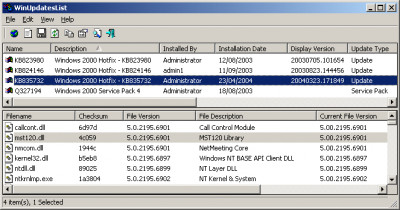
For hotfix updates, this utility also displays the list of files updated with these hotfixes. In addition, it allows you to instantly open the Web link in Microsoft Web site that provides more information about the selected update, uninstall an update, copy the update information to the clipboard, or save it to text/HTML/XML file.
WinUpdatesList is a standalone program, so it doesn't require any installation or additional DLLs. In order to start using it, just copy it to any folder you like, and run it.
The main window of WinUpdatesList contains 2 panes: The upper pane displays the list of all updates installed on your computer. When you select an hotfix in the upper pane, the lower pane display the list of files installed with the selected hotfix.
If you want to get more information about a specific update, select the desired item in the upper pane, and then from the File menu (or from the popup menu) choose 'Open Web Link'. This option opens your browser with a Web page in Microsoft site that provides information about the selected Windows update.
Notice: Some operations, like saving to file or copying to the clipboard, are performed on the pane that currently has the focus. For example: If you press Ctrl+C while the lower pane is focused, the selected files list will be copied to the clipboard. If the upper pane has the focus, the selected updates in the upper pane will be copied.
tags the upper upper pane the selected the list the clipboard information about lower pane the focus has the from the the lower about the web link
Download WinUpdatesList 1.33

Similar software
WinUpdatesList 1.33
Nir Sofer
WinUpdatesList will display the list of all Windows updates (Service Packs and Hotfixes) installed on your local computer.
 Auto-patcher for Windows 98SE 1.95 PR2
soporific
Windows 98 Second Edition (SE) was released in 1999, and since then many component updates and critical security hotfixes have also been released.
 InnDevelop SoftInfo 1.0
InnDevelop Technologies
Display software, hotfixes that are installed on your computer.
 RemoteExec 4.0
IS Decisions
RemoteExec is a very powerful tool for remotely updating your Windows NT/2/XP networks.
 Service Pack Manager 7.1.1.3
Gravity Storm Software
Looking to manage the roll out of Windows Service Packs, including the recently released Win2K SP4, within your enterprise network?
Service Pack Manager application discovers NT/2000/XP/2003 systems and reports on the current OS and Service Pack level.
 Keyser Soze's Unofficial XP Security Pack 1.002
Keyser Soze
Keyser Soze's Unofficial XP Security Pack comprises of 90% security hotfixes & 10% critical hotfixes (for pc stability).
 MoveFile 1.0
Mark Russinovich
There are several applications, such as service packs and hotfixes, that must replace a file that's in use and is unable to.
 Update Cleanup 2.00
PC Shareware Inc
Update Cleanup safely removes the backup files that were created when installing a Windows hotfix or service pack update.
 EMCO Remote Administration 3.0
EMCO
EMCO Remote Administration is a useful utility for remote deployment that allows system administrators to execute packages and script (.
 Remote Administration 3.0
DEK Software International
Remote Administration is an advanced, powerful, and feature rich application for remote deployment that helps system administrators to execute packages and scripts (.

 RSS
RSS