USBDeview 1.03
 USBDeview is a small utility that lists all USB devices that are currently connected to your computer, as well as all USB devices that you previously used.
|

 0.00
0.00  Freeware
 0K
0K
 Windows XP/Vista
USBDeview is a small utility that lists all USB devices that are currently connected to your computer, as well as all USB devices that you previously used.
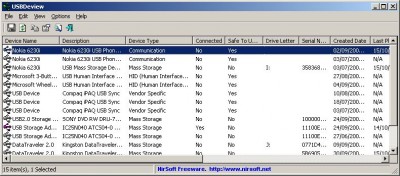
For each USB device, exteneded information is displayed: Device name/description, device type, serial number (for mass storage devices), the date/time that device was added, VendorID, ProductID, and more...
USBDeview also allows you to uninstall USB devices that you previously used, and disconnect USB devices that are currently connected to your computer.
You can also use USBDeview on a remote computer, as long as you login to that computer with admin user.
USBDeview doesn't require any installation process or additional DLL files. Just copy the executable file (USBDeview.exe) to any folder you like, and run it.
The main window of USBDeview will display all USB devices installed on your computer. You can select one or more items, and then disconnect (unplug) them , uninstall them, or just save the information into text/xml/html file.
USBDeview Columns Description:
Connecting To Remote Computer
The following command-line options allows you to connect to remote computers. You must login to the remote computer with admin user in order to use these options
Allows you to connect a single remote computer.
For Example:
USBDeview.exe /remote MyComp
Allows you to connect multiple computers, and view all their USB activity in one window. The computers list file should be a simple Ascii text file with computer names separated by colon, semicolon, space, tab characters or CRLF.
For Example:
USBDeview.exe /remotefile "c:tempcomp.txt"
Stop/Disconnect Command-Line Options
Stop/disconnect a USB device by specifying its name or description.
You don't have to specify the whole name or description. You can also specify only a part of the name or description string, and USBDeview will identify it. For example, If the device name is 'Kingston DataTraveler 2.0', you can simply put 'kingston' or 'DataTraveler' in the device name parameter, and USBDeview will disconnect the right device.
If you want that a message/balloon will be displayed after the device is disconnected, add the '/showmsg' parameter. (Windows 2000 displays a message-box, Windows XP displays a balloon)
If you want to disconnect a device in a remote computer, specify the remote computer name, with prefix. You must login to the remote computer with admin rights in order to do that.
Examples:
USBDeview.exe /stop /showmsg "DVD RW"
USBDeview.exe /stop "DataTraveler"
USBDeview.exe /stop comp01 "SanDisk Cruzer"
Similar to /stop command, but instead of specifying a device name, you should specify the serial number of the device. Works only with mass storage devices.
Examples:
USBDeview.exe /stop_by_serial ea051261
USBDeview.exe /stop_by_serial /showmsg 876534513
Stop/disconnect a USB device by specifying its drive letter. Works only with USB flash drives and CD/DVD devices.
Examples:
USBDeview.exe /stop_by_drive g:
USBDeview.exe /stop_by_drive /showmsg f:
USBDeview.exe /stop_by_drive /showmsg comp02 t:
Stop/disconnect all USB devices currently connected to your computer.
Save Command-Line Options
/stext - Save the list of all USB devices into a regular text file.
/stab - Save the list of all USB devices into a tab-delimited text file.
/stabular - Save the list of all USB devices into a tabular text file.
/shtml - Save the list of all USB devices into HTML file (Horizontal).
/sverhtml - Save the list of all USB devices into HTML file (Vertical).
/sxml - Save the list of all USB devices to XML file.
Limitations
tags the device usb devices usbdeview exe all usb remote computer the list exe stop specifies the that you device name save the mass storage usb device
Download USBDeview 1.03

Similar software
USBDeview 1.03
Nir Sofer
USBDeview is a small utility that lists all USB devices that are currently connected to your computer, as well as all USB devices that you previously used.
 HWareInfo 1.01
n37-dev
HWareInfo is a simple command line tool that will allow you to get a brief report containing information on the devices connected to your system.
 Universal Plug-and-Play Tester 2.07 Build 44.5
Noel Danjou
UPnP Tester is an experimental utility that lists all the available devices compatible with the Universal Plug-and-Play protocol, which includes Internet Gateway Devices (IGDs).
 USB@nywhere 3.1
Intellidriver Inc.
If you want to share USB devices over network and Internet use USB@nywhere.
 Multicom 2.0
Intellidriver Inc.
Multicom is appointed for emulation of one, two or more (up to
200) serial streams.
 AVSD 1.1
Virtualserialdriver Dpt. AlarIT LLC.
AVSD is appointed for emulation of one, two or more (up to
200) serial streams.
 Safely Remove 1.6
SafelyRemove.com
Safely Remove is a system tool developed to help you quick and safely stop the USB Flash Drives connected to your computer.
 DiskMemTray 1.1
NiTSOFT iNTERACTIVE
DiskMemTray is a small tool that provides you information about the usage of your system memory, the virtual memory, resources and the storage drives connected to the computer.
 PCISniffer 2
miray Software
PCISniffer is a tool that scans all PCI busses in the PC and detects automatically which busses and devices are present.
 DYDLO 1.01.03
Mouser
DYDLO (Dad You Didnt Log Off) shows a small window on top of your screen when you are connected via dial-up, showing time online.

 RSS
RSS