Usage Monitor 2.0.0.4
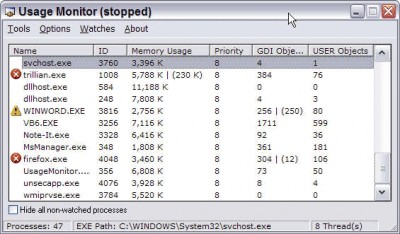
 Usage Monitor lets you set watch limits on processes to know when your process is using too much.
|

 0.00
0.00  Freeware
 0K
0K
 Windows Vista
Usage Monitor lets you set watch limits on processes to know when your process is using too much. Place watch limits on Memory Usage, GDI Objects, and USER Objects with Usage Monitor. This is a great tool for any developer.
Usage Monitor features
tags usage monitor user objects gdi objects memory usage watch limits usage gdi
Download Usage Monitor 2.0.0.4
 Download Usage Monitor 2.0.0.4
Similar software
Usage Monitor 2.0.0.4
Veign
Usage Monitor lets you set watch limits on processes to know when your process is using too much.
 ID Network Watch 1.2
ID Security Suite
ID Network Watch is a useful utility designed to provide network investigation data, keeping you informed of the status of your network traffic.
 ID Install Watch 1.2
ID Security Suite
ID Install Watch is an absolute monitoring guardian of all of your installations, securing the accurate installation and proper functioning of all of your programs.
 Directory Watch 4.0
Steve Lohja & Associates
Directory Watch is a Server Side application to monitor queues.
 EMCO Dir Monitor 2.3.2.3772
EMCO
EMCO DirMonitor is a useful and reliable system monitoring utility that enables you to put checks on your machine.
 Remote Task Manager 3.8.2
SmartLine Inc.
Remote Task Manager (RTM) is a systems control interface that can be run from any remote Windows 2000/NT computer.
 Stock Watch 1.2
Dean Morrison
Stock Watch is a useful, free and comprehensive stock tracker and performance monitor.
 Watch 1.1.4.6
Jose Falcao
Watch - Very small 'desktop' timer watch, with date and alarms.
 Interbase Performance Monitor 2.2
Mitec
Interbase Performance Monitor allows profile and watch database operations.
 ProcessGuard 1.1
Skrommel
Watch processes' cpu usage, memory usage and more, and get a warning, close them, run a program, change priority, hide/show or minimize/maximize them, reboot, logoff, shutdown, suspend or hibernate!
Here are some key features of "ProcessGuard":
· Edit the ini-file to change the settings.

 RSS
RSS