Tray Tools 2000 2.6
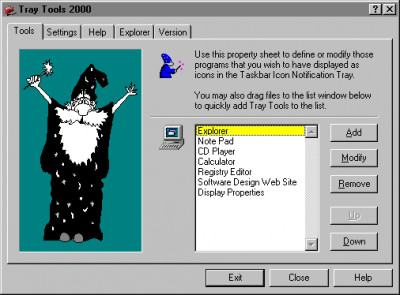
 Tray Tools allows you to place up to 24 program icons in the Taskbar Tray.
|

 0.00
0.00  Freeware
 0K
0K
 Windows Vista
Tray Tools allows you to place up to 24 program icons in the Taskbar Tray. Program icons that you place there can be launched by simply clicking your mouse on them.
To add new programs or modify existing items click your mouse on the small red toolbox icon displayed in the tray.
You can also modify an existing program icon by right-clicking on it directly from the Taskbar Tray.
tags your mouse taskbar tray the taskbar program icons
Download Tray Tools 2000 2.6

Similar software
Tray Tools 2000 2.6
Gregory Braun
Tray Tools allows you to place up to 24 program icons in the Taskbar Tray.
 PS Tray Factory 3.3
PS Soft Lab
PS Tray Factory is a powerful and handy tool meant to flexibly control ALL the other icons in the system tray of the taskbar.
 Tray Pilot Lite 1.10 build 7
Invention Pilot, Inc
Tray Pilot allows you to hide the System Tray icons.
 12Ghosts TrayProtect 9.70
12Ghosts Inc.
12Ghosts TrayProtect is used for keeping track of the many tray icons that you don't need all the time.
 Tray Pilot 1.20 Build 14
Invention Pilot, Inc
Tray Pilot allows you to hide the System Tray window.
 SysTray Control 2.0
Charon Software, Inc.
SysTray is a 32-bit ActiveX control for Visual Basic (or any other ActiveX host) witch helps you place one or more icons in the system tray (bottom-right corner of the screen).
 Taskbar Hide 3.5
Taskbar Management
Taskbar Hide allows you to control your taskbar and optionally hide or to unhide or arrange/rearrange programs
With Taskbar Hide you can fully control the taskbar.
 SysTrayX 4.00
XDESKSOFTWARE
SysTrayX is a very useful tool created to maximize the way you can use your system tray.
 Captain Tray Pro 6.4
Almeza
Captain Tray Pro is a simple and effective package tool for windows management under Microsoft Windows operating systems.
 tssTrayNotify 1.0
Teebo Software Solutions
tssTrayNotify is an ActiveX component that will let you quickly and easily place clickable icons in the system tray, and show popup balloon tooltips, just like those seen in Windows XP.

 RSS
RSS