TK8 Backup 4.1
 TK8 Backup - backup your files and folders, as well as Address Book, Favorites, Outlook Express emails and settings, etc.
TK8 Backup - backup your files and folders, as well as Address Book, Favorites, Outlook Express emails and settings, etc.
Upload backups to remote FTP servers, save to hard disk, CD, DVD or to any other media. Flexible scheduling options and unique folder monitoring option ensures you always have the latest version of your important files.
TK8 Backup is a software that allows you recover your files and folders.
Advanced users can benefit from additional features like ZIP compression, network support, source file filtering, logging, encryption, self-extracting backups etc.
Here are some key features of "TK Backup":
Flexible backup system
Making backups of files and folders is fast and easy. Imagine how useful it would be to have your documents, Address book, Favorites and Outlook or Outlook Express data all backed up daily. Never lose another email by accidentally deleting it.
By setting up different backup profiles you will have a flexible backup system. Each profile can have its own settings like which files to back up, how often, how many of your previous backups to keep, where to keep them, etc.
Data backups
TK8 Backup is data backup software. It is designed to back up your documents, files and folders. It can not make full system backups which would include everything in one huge backup (including operating system and boot sectors).
Data backups have many advantages over the full system backups. Most important is that data backups are much smaller and will take less time to create. They are also easier to operate. In addition, with data backups you can restore any single file or folder when you need it. You do not have to restore the entire system to access your data.
Incremental backups
In addition to complete data backups, TK8 Backup can also create incremental backups. With incremental backups only changed or added files will be backed up, compared to the last backup. This means smaller backup files and saved disc space.
Compression
To save your disc space, all backups are compressed automatically. The popular ZIP compression used is fast and efficient. For example, some text documents can be compressed more than 90%.
Security
Backups can be password protected and encrypted. One of the most secure encryption algorithms is used to secure your data (256 bit Rijandael). So you never have to worry about unauthorized access to your information.
Backup to different types of storage
Backups can be saved to your hard disc, local network drives, CD, DVD, USB discs, Zip drives, Jazz drives, MO drives, etc. If your backup is too large enough to fit one disc, TK8 Backup can split it and save it on multiple discs. Even duplicate locations can be set up to keep your data in different places.
Off-site backups
You also have the option to automatically upload your backup ZIP files to an off-site server using the built in FTP client, so that the information is available should a fire or burglar destroy your computer.
Scheduler to automate backup jobs
Once backup profiles are set up, you can make backups with a single mouse click. You can also use the scheduler, so backups would be created automatically on hourly, daily or monthly basis.
By using scheduler, you don’t have to worry about forgetting to back up your data. Different options and unique folder monitoring system ensures you always have the latest version of your important files.
Easy backup management
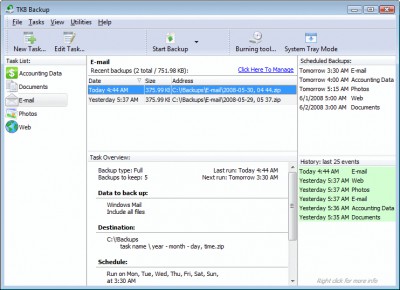
Not only making but also managing your backups is important. As you can have separate backup versions of your data, it is important to see how much space they are taking, where are they located, which files they contain, etc. You might also want to burn additional copy to another CD or DVD. For all this, recent backups list is always seen on the main screen, allowing you to easily manage backups of the selected profile.
Quick restoring and self-extracting backups
Built in Restoring Wizard is the tool that makes restoring your data easy. To get your data restored, just follow the steps. Quick restoring option allows you to restore the whole backup without any wizard questions.
TK8 Backup can also create self-extracting backups. In addition to your data, the executable backup file also contains the restoring wizard. So you do not need any other program to restore your data. Just execute the backup file and follow the wizard steps.
Advanced users can use many additional features and options like filtering source files, backing up open files, unlimited backup file size, backup process logging, email notifications, processor usage limits, system tray mode, hidden mode, integrated CD and DVD burning tool, easy FTP management utility, etc.
Help and support
Help file and the manual is included with the program so you could get to know all the features and benefits TK8 Backup can offer. If you should have any questions, our fast customer support team is always ready to help you.
Limitations
30 days trial.
Nag screen
tags your data tk8 backup files and data backups you can backup can and folders self extracting have the incremental backups extracting backups backup file can also
Download TK8 Backup 4.1
 Download TK8 Backup 4.1
Purchase:  Buy TK8 Backup 4.1
Similar software
 Backup Outlook Express 2.0
StaticBackup Inc.
Outlook Express Backup is thesoftware that can backup and restore Outlook Express Data.
 BackRex Outlook Express Backup 2.8.178
BackRex Software
BackRex Outlook Express Backup is a backup and restore utility for Outlook Express and Internet Explorer.
 Easy Backup for Outlook Express 2.374
Ixis Ltd
Easy Backup for Outlook Express lets you backup and restore your Outlook Express data such as identities, email messages, email account settings, message rules, the address book, list of blocked senders, signatures and settings as well as backup and restore your Favorites, Windows Address Book and My Documents.
 ABF Outlook Express Backup 2.75
ABF software Inc
ABF Outlook Express Backup is a backup and synchronization tool for the popular Outlook Express mail client.
 Turbo Outlook Express Backup 1.0
Abhisoft Technologies
Turbo Outlook Express Backup is a useful and easy to use email backup tool that can backup your Outlook Express Emails and settings.
 Any Outlook Express Backup 2.30
Risnow Software
Any Outlook Express Backup is a powerful and easy-to-use tool which allows you to backup and restore your Outlook Express data.
 Eastsea Outlook Express Backup 2.30
Eastsea Software
Eastsea Outlook Express Backup is an easy-to-use program that allows you to backup and restore your Outlook Express information.
 Outlook Express Backup Pro 5.5
NeoMatrixes Computing, Inc.
Outlook Express Backup is an easy-to-use Outlook Express utility that can quickly backup and restore your Outlook Express data.
 Outlook XP - Easy Outlook Express Backup 1.51
OutlookXP Networks
Outlook XP - Easy Outlook Express Backup is an easy-to-use synchronization and backup tool for the popular Outlook Express mail client.
 Outlook Express Backup Wizard 1.1
QSX Software Group
Outlook Express Backup Wizard is an easy-to-use utility that allows you to backup and restore your Outlook Express data.

 29.00
29.00  Trial
Trial 0K
0K
 Windows Vista

 RSS
RSS