TimeTrack Professional 3.0.2
 TimeTrack is the easiest way to keep track of your computer activties and usage time automatically.
|

 24.00
24.00  Trial
Trial 0K
0K
 Windows XP/Vista
TimeTrack is the easiest way to keep track of your computer activties and usage time automatically.
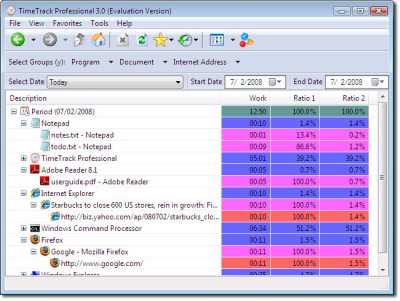
TimeTrack Professional is an easy-to-use utility that log every single of your computer activities and gives a detail report of which applications, documents or web-sites that have been attracting your attention.
If you find that your precious time has been going to waste in front of your computer, and simply have no idea where they have been squandered away, then you need TimeTrack.
TimeTrack Professional features
Limitations
tags web sites your computer have been timetrack professional keep track applications documents
Download TimeTrack Professional 3.0.2
 Download TimeTrack Professional 3.0.2
Purchase:  Buy TimeTrack Professional 3.0.2
Similar software
TimeTrack Professional 3.0.2
Bit Computing
TimeTrack is the easiest way to keep track of your computer activties and usage time automatically.
 TimeTrack 0.4.1
Bit Computing
TimeTrack is the simplest method to keep tracks of your PC tasks and usage time automatically.
 Computer Usage Timer 1.0
Schmidt6 Software
Computer Usage Timer runs is a useful utility which silently times how long the computer is in use (in use in this case means the keyboard and mouse are actively being used).
 D.G. Net Meter 1.1.38
Daniele Giabbai
D.
 Computer Status Monitor 3.1
PurpleParrotPrograms
The Computer Status Monitor program is one that's designed to display various types of information about your computer, including memory usage, CPU usage, resource usage (only applicable in Windows 9x and ME), battery charge status and level (if applicable) and disk usage.
 UserTime 1.2.005
Software Studio Ltd
UserTime is software for recording & analyzing the time you spend on your computer! It runs in the background & records the time you've been logged on to your computer, as well as the time each user is actively using the computer.
 Internet Usage Monitor 7.7 Lite
Gaurav Dhup
Internet Usage Monitor keeps track of the time and cost(telephone charges) you spend on the internet, thus helping you regulate those sky-rocketing telpone bills.
 CPUShut 1.0
asvzzz
CPUShut will automatically shutdown (or hibernate/suspend) your computer after predefined time if CPU usage less than predefined level.
 Auto Shutdown Genius 2.3
Lonking Software, LLC
With Auto Shutdown Genius, you are able to automatically shutdown, power off, log off, lock workstation, hibernate, standby or screen save your computers at schedule date and time, when the computer is idle or when excessive CPU usage.
 statlook 2.1
A plus C
Statlook is a comprehensive system for IT asset management, covering all major IT resources, such as: user activity, license compliance and software and hardware inventory.

 RSS
RSS