RunAs Professional 3
 RunAs Professional is am alternative for Microsoft's command runas.
|

 15.00
15.00  Shareware
 0K
0K
 Windows XP/Vista
RunAs Professional is am alternative for Microsoft's command runas.
RunAs Professional solves the problem that normal runas does not support the commandline parameter password.
Now you can use RunAs Professional to install software, use it in batch skripts and much more.
If you use RunAs Professional you can start an application with other credentials without log off and log on.
Because Nero does not run very properly without administrative rights you can build a crypted file with RunAs Professional in wich all the logon-data is stored. Then just double click on this file an Nero is launched with administrative rights - without entering password and username.
It is possible to run runAs Professional from the commandline with a password argument.
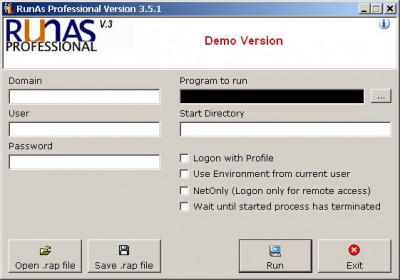
With RunAs Professional you could build crypted RAP files in wich all the logon-data and the application to run is stored in. The files are crypted with AES the well known symmetric algorithm.
Simply with a doubleclick you can run the application with other user rights.
You have the opportunity to run RunAsP with commandline arguments:
RunAsP /domain: /user: /password: /command: [/silent] [/register]
/domain:domain - domain: Domain the user logs on use %computername% for current computer.
/user:user - user: Windows Username used for the logon
/password:pwd - pwd: Password used for the logon
/command:cmd - cmd: Command to run. Put the command into quotes (")
[/startdir:dir] - dir: specifies the start directory of the launched program
[/silent] - Optional, no errormessages are given.
[/register] - Optional, reigsters the .rap files for execution.
[/profile] - Optional, logon with profile
[/netonly] - Optional, log on, but use the specified credentials on the network only.
[/env] - Optional, logon using current Environment
[/wait] - Optional, wait until started application has closed
[savefile:fn] - Optional, fn: filename of a rap file. RunAsP will save all given data to the rap file given as fn. Put the fn into quotes (").
Example:
RunAsP /domain:company /user:supervisor /password:KD!"§*##d3
/command:"notepad.exe"
tags runas professional you can the logon domain domain user user used for runasp domain the application for the put the rap file optional logon the rap
Download RunAs Professional 3

Purchase:  Buy RunAs Professional 3
Similar software
RunAs Professional 3
MAST Hard- & Software
RunAs Professional is am alternative for Microsoft's command runas.
 High Road 1.0
Cyntrigal
High Road is a replacement for the RunAs command in Windows 2 and Windows XP.
 ADVrunas 1.1
ADVtools SARL
Windows RunAs command and shortcut menus are great for System Administrators and Advanced Users.
 Encrypted RunAs 1.1.6
Wingnut Software
Encrypted RunAs is a small tool that is created to make the job of Administrators a little easier, it can be used to run applications or software installations with access rights a standard user does not have.
 Steel RunAs 1.0
SteelSonic
Steel Run-As helps you in executing audit commands or any kind of application which runs properly when run only with administrator privileges without having to give the user full rights to his machine.
 NeoExec for Active Directory 1.1
NeoValens
NeoExec for Active Directory is an operating system extension for Windows 2000/XP that allows the setting of privileges at the application level rather than at the user level.
 BytesRoad SafeLauncher 1.5
BytesRoad Software
If you have ever used RunAs utility, which is supplied together with the Windows, then SafeLauncher is the best choice for you.
 DiskLogon 2.5.1.53
DiskLogon.com
DiskLogon is one of the most powerful and securest logon software.
 Sudoers 1.0.6
perfectsw
Sudoers is a useful tool that allows a local administrator to give certain LUAs (Least-Privileged User Account) the ability to run some (or all) applications as system administrator.
 RichTextPad 1.0
Vivid Designs
Ever wanted to have more than one document open in Notepad? Well, RichTextPad solves your problem.

 RSS
RSS