PropertyEditor 5.0
 PropertyEditor is a shell extension for Windows Explorer that allows you to customize desktop icons and context-menu of each folder, file and drive you choose.
|

 29.00
29.00  Shareware
 0K
0K
 Windows Vista
PropertyEditor is a shell extension for Windows Explorer that allows you to customize desktop icons and context-menu of each folder, file and drive you choose.
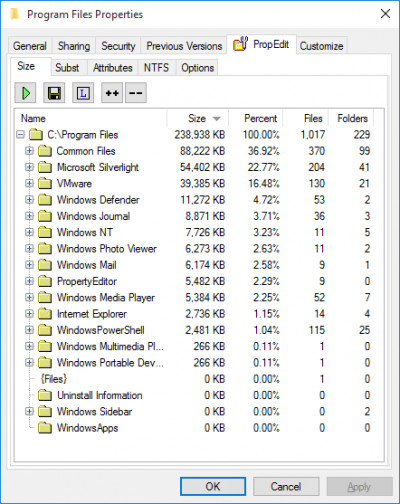
PropertyEditor allows you to create detailed reports about the size of any drive or folder on your PC.PropertyEditor is a tool that can modify the parameters of files.
This information helps you analyze usage of your hard drives and keeps your data well organized.
With PropertyEditor you can see and edit some very useful hidden features of NTFS (file system of Windows NT/2/XP), such as Streams, Junctions, Hard Links and Mount Points.
Windows 2 introduces the Encrypting File System (EFS) so that users can protect their sensitive data (Windsows XP supports encryption too).
PropertyEditor lets you see who has access to encrypted files.
Also with PropertyEditor you may modify the date and time that a file or folder was created, last accessed, and last modified, as well
PropertyEditor allows you easy to modify attributes of files, folders and drives (including attributes, which you will not be able to change in Explorer).
Unicode support is added.
Improved interface.
"Options" page is moved to context menu of "TreeSize", "Menu" and other pages.
Page "TreeSize"
You can set up processing of Junctions and Mount Points.
Increased speed up to 10 times.
Page "Menu"
More convenient interface
Page "NTFS"
Subst: You can see all mounted drives with target path.
Links: You can find all hard links for selected hard link.
Streams: You can see all system streams and their type.
Encryption: You can see encryption information for folders.
New page "Search": You can find all links on your local drives.
Page "Icons"
You can change icons for all drives.
Page "Attributes"
NTFS attributes are separated from global attributes.
The folder Info Tip is moved to this page.
tags you can can see allows you mount points see all can find drives page find all and mount file system with propertyeditor modify the propertyeditor you
Download PropertyEditor 5.0

Purchase:  Buy PropertyEditor 5.0
Similar software
PropertyEditor 5.0
UsefulSoft
PropertyEditor is a shell extension for Windows Explorer that allows you to customize desktop icons and context-menu of each folder, file and drive you choose.
 Context Menu Extension DLL 3.1
Dmitry Miloserdov
The Context Menu Extension DLL is a very easy way to add Windows Explorer context menu extension (like WinZip) into your own software applications.
 CVS Shell Extension 1.7.2
WoLoSoft International
This Shell Extension integrates the CVS version control system into Windows Explorer.
 WisdomBay Eazy Shell 1.0.1
Wisdombay
WisdomBay Eazy Shell is a free and simple Shell Extension adder, for windows explorer.
 FindMe 1.0
Timothy Conner
FindMe is a program that adds a command (FindMe) to the context menu of shortcut files (.
 SP Shell icons 1.28.0.13
Andrew N. Balahonov
SP Shell icons represents a small program that will change Windows system icons to it's own.
 IconSaver 2.2
Mario Knok
IconSaver is a small Windows tool that saves and restores icons' positions on the Desktop window.
 ShellExView 2.01
NirSoft
Shell Extensions are in-process COM objects which extends the abilities of Windows operating system.
 Align Icons 2.0
Kanex Group, Inc.
Align Icons is a Windows context menu addition that allows you to align icons in any way you want.
 Shell MegaPack ActiveX 2012
Sky Software
Shell MegaPack ActiveX brings drop-in Windows Explorer shell browsing functionality to your application.

 RSS
RSS