HSLAB Free Force Down 2.7.5.3
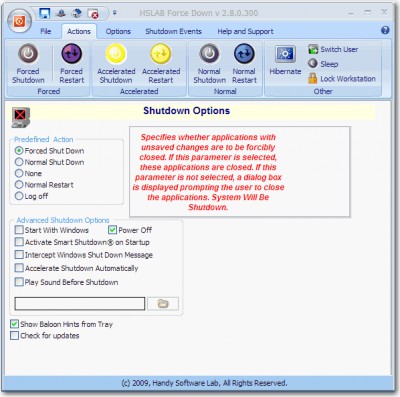
 HSLAB Free Force Down was created for fast and guaranteed execution of
Windows Shutdown if there is a plenty of open programs.
HSLAB Free Force Down was created for fast and guaranteed execution of
Windows Shutdown if there is a plenty of open programs.
|

 0.00
0.00  Freeware
 0K
0K
 Windows XP/Vista
HSLAB Free Force Down was created for fast and guaranteed execution of
Windows Shutdown if there is a plenty of open programs.
Allows to fulfil:
Also, some different external events can be processed:
Use of external events gives you the broadest opportunities by definition of the moment of a shutdown, restart or switching your system off .
Requirements
Limitations
The following options are not available in the Free"Lite" version:
tags shutdown when when selected command shutdown removable media windows shutdown and execute shutdown eject external events selected file hook and eject removable command line shutdown and
Download HSLAB Free Force Down 2.7.5.3
 Download HSLAB Free Force Down 2.7.5.3
Similar software
HSLAB Free Force Down 2.7.5.3
Handy Software Lab
HSLAB Free Force Down was created for fast and guaranteed execution of
Windows Shutdown if there is a plenty of open programs.
 HSLAB Force Down Lite 2.7.5.3
Handy Software Lab
HSLAB Force Down was made for fast and guaranteed execution of
Windows Shutdown if there are too many opened applications.
 HSLAB Force Down 2.5.12
Handy Software Lab
HSLAB Force Down was made for fast and guaranteed execution of
Windows Shutdown if there are too many opened applications.
 HSLAB Shutdown Folder Lite 2.0.4
Handy Software Lab
HSLAB Shutdown Folder is a utility which will provide a service analogous to the Windows 9x/NT/2000/XP "Startup" folder.
 HSLAB Shutdown Folder 1.8.9
Handy Software Lab
HSLAB Shutdown Folder is a utility which provides a service analogous to the Windows 9x/NT/2000/XP "Startup" folder.
 Force Shutdown 1.2
Ergoworx
Force shutdown is an easy to use time save tool, saving you from several clicks when you are finishing work with PC.
 Multi-Remote Shutdown Manager 1.0
Eytcheson Software
Multi-Remote Shutdown Manager is an easy and screamingly fast way to shutdown the computers you administer.
 EugeneShutdown 1.00
EugeneSoft
EugeneShutdown is a system utility for Windows 9x/ME/NT/2000/XP operating systems that allows to automatically power off, shutdown, reboot or log off current user at a specific time on your system and initiate shutdown of remote computer.
 FGSessionManager 1.0
Softech di Germinara Francesco
FGSessionManager is a free and simple dialog panel that comes with five buttons: Logoff user session, Reboot, Shutdown ,Power off, and Force shutdown.
 Auto Win Shutdown 2.0.1
MBSD
With MBSD Auto Win Shutdown you can easily schedule your windows based operation system to shutdown when you wish.

 RSS
RSS