Focus Genie 2.1
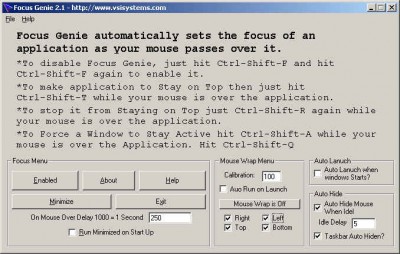
 Focus Genie sets the focus on an application when the mouse passes over it.
|

 9.00
9.00  Trial
Trial 0K
0K
 Windows Vista
Focus Genie sets the focus on an application when the mouse passes over it.
To disable Focus Genie, just hit Ctrl-Shift-F and hit Ctrl-Shift-F again to enable it.
If you would like an application to Stay on Top then just hit Ctrl-Shift-T to stop it from Staying on Top just Ctrl-Shift-T again.
Limitations
tags ctrl shift hit ctrl just hit focus genie
Download Focus Genie 2.1

Purchase:  Buy Focus Genie 2.1
Similar software
Focus Genie 2.1
VsiSystems.com
Focus Genie sets the focus on an application when the mouse passes over it.
 Key Mouse Genie 4.1
VsiSystems.com
Key Mouse Genie is an application that allows you to control your mouse using your keyboard.
 Image In Focus 2.0b
Special K Software
Image In Focus is a nice tool that combines various out of focus images to create a single Montage composite in-focus images.
 Zip Code Genie 1.01
Spud City Software Co.
Want to type addresses easier and faster?
Your wish has been granted!
Activate your Zip Code Genie script by typing a hotkey combination on your keyboard (for example, Ctrl+1).
 Focus Options 0.5.2
Ken Scudero
 Highlight Focus 0.2.1
Rudolf Noe
Highlight Focus is a Firefox-Extension that will highlight selectboxes, textfields and textareas when getting focus with an configurable background and/or border color.
 Startup Genie 1.2
Amic Utilities
Startup Genie is a handy software utility that allows you to control what programs run at system startup when you turn on or logon to your computer.
 Focus VideoPhone 3.4b
Focus Media
Program uses effective video-codec developed by Focus Media that allows to use the application with minimal network resource occupy.
 Swap Machine 1.3.2.9
Daxoft
Swap Machine is a keyboard shortcut manager with advanced functionnality.
 Asterisk Recovery Genie 1.20
Lenosoft
Asterisk Recovery Genie is an easy to use password recovery application for Windows.

 RSS
RSS