EZ Macros 5.1
 EZ Macros is the ultimate keyboard macro application and now it has even more features.
|

 29.00
29.00  Trial
Trial 0K
0K
 Windows Vista
EZ Macros is the ultimate keyboard macro application and now it has even more features.
The intuitive interface makes EZ Macros the perfect tool for both new and experienced users.
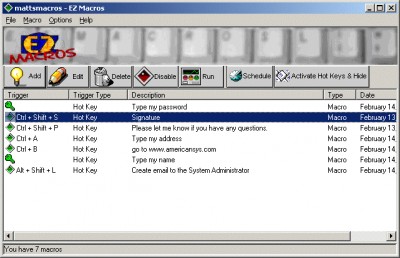
It can "record" keystrokes and/or mouse movements or macros can be created and edited manually. You can automate tasks with just a few keystrokes and hundreds of possible macro hot keys are available. EZ Macros features both global and program-specific macros. "Global" macros can be used with all your programs, while "program-specific" macros work only with particular programs.
Tired of typing in the date on documents? Just create a macro that puts the date in for you. Find yourself always using the same 3 programs on a certain project? Create a macro that launches all of them with a simple keystroke! When you create or edit a macro, EZ Macros lets you insert pauses, delays, sounds, date, time, and more!
With the FREE companion program, EZ Scheduler, macros can be scheduled to run at Windows startup, once, hourly, daily, weekly, and monthly. On the Internet you can launch your email program or go to your favorite web sites by hitting a simple keystroke.
With so many computers in use, in both home and business settings, many people are concerned about security. EZ Macros has that covered too! You can create "secure" macros. A secure macro is protected by a password issued by you, and once secured, no one can see the keystrokes that activate a secure macro. In addition, secure macros can only be edited, deleted, or scheduled by you.
So, if you're getting tired of doing the same things over and over, try EZ Macros. Make macros for all those repetitive things and simplify your life by doing them with simple keystrokes!
EZ Macros features
tags you can the date macros can you create lets you macro that the same and more specific macros macros lets simple keystroke them with program specific
Download EZ Macros 5.1

Purchase:  Buy EZ Macros 5.1
Similar software
 Quick Macro 6.6
Quick Macro
Quick Macro (QMacro) is an intelligent software to record, replay and edit keyboard & mouse macros.
 Macro Wizard Keyboard Mouse Recorder 2.1
Vsisoftware.com
Macro Wizard Keyboard Mouse Recorder 4.
EZ Macros 5.1
American Systems
EZ Macros is the ultimate keyboard macro application and now it has even more features.
 Audiomatic 1.21.06
Wise Riddles Software
Audiomatic is a tool used to make system-wide macros and then launch those macros with a voice command or keyboard shortcut at any time.
 Macro ToolsWorks 6.25
Pitrinec Software
Macro ToolsWorks is powerful all-in-one Windows automation utility that combines all features of Perfect Keyboard, MacroToolbar, WinScheduler and ClickyMouse programs.
 Macro Keyboard Mouse Recorder Wizard 2.1
VsiSoftware.com Inc
Macro Wizard Keyboard Mouse Recorder is a software which lets you to record and play back keyboard and mouse actions.
 Easy Macro Recorder 4.9
flashplayerpro.com
Easy Macro Recorder is a handy utility that makes your computers automatically do work for you.
 Workspace Macro 4.6.1
Tethys Solutions, LLC
Workspace Macro is a helpful and user-friendly Windows automation application and macro recorder.
 AllKeys Macro 2.002 Beta
SeventhDigit Software
AllKeys Macro software represents a macro application combined with a break timer and mouse replacement tool designed to help you improve your efficiency on the computer.
 MacroToolbar Standard Edition 6.31
Pitrinec Software
MacroToolbar is a useful software which allows users to create macros working in any Windows application and run them on single mouse click from customizable toolbar.

 RSS
RSS