Desktop Collection 1.2
 Desktop Collection combines everything you need for convenient computer operation and control into one economical package.
|

 58.00
58.00  Trial
Trial 0K
0K
 Windows Vista
Desktop Collection combines everything you need for convenient computer operation and control into one economical package. System tools give you enhanced control over your system startup, convenient system tray access to your favorite applications and folders and quick access to the folders you use most often in standard folder dialogs. Award-winning Desktop Collection applications have an easy to use Windows Explorer type user interface.
The Desktop Collection includes registration for the latest versions of:
TrayIcon Professional Edition 1.7
TrayIcon Pro is a Windows 95/98/NT/2000/ME/XP/2003 application that was developed to let you quickly run your favorite applications and folders directly from the system tray.
TrayIcon Pro lets you add icons for these applications and folders to the tray itself or into menus that sit behind icons in the tray. Finally, the functionality of our whole TrayIcon range is brought together in one easy-to-use application.
The new version adds support for Netscape Bookmarks and Opera Hotlists as well as a history of recently browsed URLs. So, you can easily browse Web sites directly from your tray!
Another great feature is the ability to minimize any of your application to the system tray. TrayIcon Pro adds its button next to the standard Minimize/Maximize/Close button to all windows. You can choose to minimize the application to a separate tray icon or to a menu in the tray.
The new version allows you to protect icons from being started with a password - to limit access to some programs if the computer is shared between several users.
c 2.8
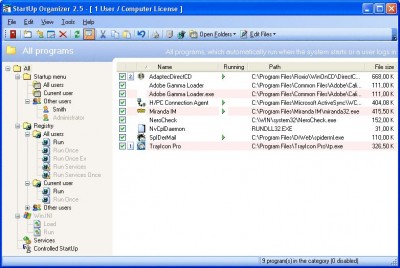
Startup Organizer is a program that was developed to provide quick access to all of the programs that are automatically started when you turn on or logon to your computer.
Using Startup Organizer, you can inspect, edit, print and/or temporarily disable such programs and make backup configurations.
You may significantly reduce the time required for your system startup by disabling programs that you don`t need all the time.
With RunOnceEx, Services and AutoRunDLL technology support, StartUp Organizer provides you with the most complete control on all methods to start programs automatically.
The Controlled Startup feature allows you to skip certain programs during startup if you hold the [Shift] key while Windows is logging on.
The new version allows you to choose the key for the Controlled Startup feature. It is also possible now to prompt for a confirmation of whether to start all or each program in the Controlled Startup.
StartUp Guard detects non-standard ways to run applications when Windows starts and issues recommendations when it encounters suspicious programs.
Users can benefit from the new ability to work with other users` startup configurations. StartUp Organizer displays other users among your standard Registry, Controlled Startup and Start menu items. You can view programs of other users, edit them, add new ones and drag programs to them.
You can even add programs to multiple users with just a few clicks! You can also define the order in which to run your programs and even set a delay when running them consecutively.
AutoDialogs 2.3
AutoDialogs is a program that was developed to provide quick access to the folders you use most often in standard Open/Save as/Browse for folder dialogs (including all Microsoft Office versions and Windows 2000/XP/2003 dialog boxes), Windows Explorer and many other programs.
Using AutoDialogs, you can automatically insert preselected folders into your dialog boxes using a system tray menu (requires only two clicks) or a pre-assigned hot key (one keystroke.) With AutoDialogs, you no longer need dozens of mouse clicks to navigate to that desired folder!
The new version introduces better AutoDialogs menu organization, better Properties dialog and a detailed Tutorial which will guide you through the AutoDialogs features.
DeskTool 3.1
DeskTool is a desktop toolbar designed to give you easy access to frequently-used applications by displaying an organized row of buttons from which to choose.
DeskTool can serve as the replacement for Microsoft Office 2000/2002 Bar, or as an addition to it. The bar can be aligned to the left, right, top or bottom desktop side, or to float at any screen position.
DeskTool has some nifty features that you might have come to expect from a modern Windows application. Drag and Drop is supported for adding, deleting and moving buttons around on the toolbar.
You can "dock" DeskTool to any one of the four edges of your screen, much like the Windows 95 taskbar, or leave it free floating on the desktop. You can also make the toolbar "auto-hide" when docked to an edge, just as you can with the taskbar. DeskTool can be made to stay on top of other windows, making it readily accessible.
Limitations
tags you can the new startup organizer controlled startup system tray new version the controlled allows you was developed that was quick access applications and the tray
Download Desktop Collection 1.2
 Download Desktop Collection 1.2
Purchase:  Buy Desktop Collection 1.2
Similar software
 MetaProducts Collection 1.0
MetaProducts Corporation
MP Collection combines everything you need for smooth and powerful computer operation into one economical package.
Desktop Collection 1.2
MetaProducts Corporation
Desktop Collection combines everything you need for convenient computer operation and control into one economical package.
 Desktop Notes 1.2.3
Intelore
Desktop Notes is a program that will allow you to post notes on your Windows desktop.
 Soroban 1.3
Tomoyasu Kato
Soroban software represents the desktop abacus of computer control.
 Bible Collection Plus 1.0
Grant & Capizzi
Bible Collection Plus combines two award winning programs into one low priced high value package.
 HSLAB Print Logger WE 4.3.1.4
Handy Software Lab
Lower your printing expenses by setting quotas for printing!
The Print Logger software is intended for a control and audition printing activity on a printers.
 Recorded TV Manager 0.2.1
Drasch Computer Software
Recorded TV Manager is a useful application that provides a familiar and convenient user interface to manage your collection of television programs recorded by Microsoft Media Center Edition (*.
 Remote Desktop Inspector 1.2.8
Toleron Software
Remote Desktop Inspector lets to supervise desktop of the remote computer and meant for those who want to know what other people do.
 Desktop Rover 3.2.0.8
Neslo Software Inc
Desktop Rover will allow you to keep an eye on up to 32 computers (and now Pocket PCs) with a single computer's keyboard and mouse.
 PC Chaperone Personal 5.1.391
PC Chaperone Parental Controls
PC Chaperone parental control software combines the most comprehensive and powerful tools available and is trusted by parents all around the world to give them control over almost every aspect of their children’s computer use.

 RSS
RSS