ASIS Backup 2.4
 ASIS Backup - We know what you think: "Another backup utility? I have seen too many of these already.
|

 29.00
29.00  Shareware
 0K
0K
 Windows Vista
ASIS Backup - We know what you think: "Another backup utility? I have seen too many of these already. You can't surprise me with another one. I've seen scheduled backups, remote backups, incremental backups and anything-else-backups." Ok, but how about a bootable backup? Surprised?
ASIS Backup is a software that create and run backup copies.
What do you do when your hard disk crashes or your computer simply won't start? You could restore your files from a backup copy. But how can you restore anything if you can't even boot your computer? It turns out to be a real problem. You need to boot up your computer in order to restore your files, but you need to restore your files in order to boot up your computer. Re-installing Windows from a CD, re-downloading and re-installing all the service packs and security patches via the Microsoft Windows Update system, re-setting all your preferences (and more) is a hard and time-consuming method.
SoftoTec offers a brand new, fully-automated solution to this problem: ASIS Backup. How is it different from other backup utilities? Backup copies made with ASIS Backup are bootable. This means that you can boot your computer from a backup CD or DVD disk created by this program.
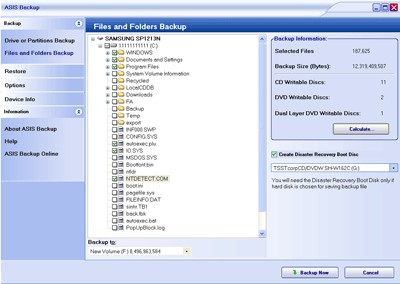
You can make a backup image of your hard disk or selected partitions. You can also backup specific files and folders including system files. ASIS Backup calculates the space needed to backup your data and the number of disks required according to the media format selected (CD-R/RW and DVD-R/RW of all kinds). You don't need to use third-party CD/DVD burning software. ASIS Backup will burn disks for you.
Restoring your data from disks created by ASIS backup is a joy. Just put in a disk and turn your computer on. Your computer will boot from this disk. This allows you to get back to a working state of your PC in minutes. No need to re-install Windows and other programs. The restoration process is surprisingly simple and fully-automated.
Requirements
File systems: FAT & NTFS. IDE based Systems only.Limitations
Only partition C is backed up.
tags asis backup your computer you can your files restore your you need fully automated your data boot your backup copies your hard but how hard disk
Download ASIS Backup 2.4

Purchase:  Buy ASIS Backup 2.4
Similar software
ASIS Backup 2.4
SOFTOTEC
ASIS Backup - We know what you think: "Another backup utility? I have seen too many of these already.
 Champion Backup 1.0
Champion Software
Champion Backup is a powerful utility able to backup a file within two minutes of it being saved or created.
 ASIS-The Auto Service Information System 2.1p
carcarebizsoftware.com
ASIS-The Auto Service Information System - take advantage of our expertise.
 TopLang OE Backup 5.0
TopLang software studio
TopLang OE Backup utility is a backup tool for MS Outlook Express and MS Outlook.
 SoftoTec BackItUp 1.5.0
SOFTOTEC
Today's subject is BackItUp, another backup solution from SOFTOTEC.
 @Home Backup 3.0.4.17
RD Technologies
@Home Backup is a backup tool for home computing in a familiar wizard mode.
 Elementec Backup & Compress 1.1.6
Elementec Software & Consulting Dr. Peter Kullmann
Backup & Compress is an utility for automatically creating backups of the valuable data on your computer.
 HD Picture Album Backup/Restore Utility 3.0
EK Inc.
HD Picture Album Backup/Restore Utility is a powerful app designed from the ground up to take care of all your pictures backup/restore needs.
 EZ IE Backup 1.21
RinjaniSoft
EZ IE Backup is an application designed to easily automate common backup routines.
 AlmerBackup 4.8
AlmerSoft
AlmerBackup is a useful backup and restore utility which helps you to backup your files to hard drives, network drives, floppy disks , Zip drives, SyQuest and most other removable devices.

 RSS
RSS