WinForcer 3.3
 Prevent unauthorised users from running any Windows application you specify.
|

 24.00
24.00  Shareware
 0K
0K
 Windows Vista
Prevent unauthorised users from running any Windows application you specify. Block the desktop, Start button, Control Panel, Hide Drives or block individual folders. WinForcer is fully user configurable and supports different settings for each user or global blocking.
All the items are configurable through the WinForce Config Application and changes to your configuration are implemented immediately without the need to restart Winforcer or log off. You can use WinForce to block any application or Folder through WinForcer.
Administrators can suspend WinForcer to regain access to the users desktop without having to log out. You can configure multiple machines by using distribution configuration files. So you do not need to individually set up each machines config.
Can be configured not to WinForce the Administrator User or prompt anyone logged in as administrator for the password thus ensuring you will not forget the password. (WinForcer assumes that the network admin password is secure).
Once you have installed WinForcer you can begin to use it to block access to programs and system options on your PC. Please not that the initial password to suspend / uninstall or change any options in WinForcer is norun. You should ensure the password is changed at your earliest convenience.
To start using WinForcer to block your programs you can click on the WinForce Client application, found by clicking Start, Programs, WinForcer, WinForce Client. Alternatively you could log out and in again. WinForce Client will autostart on log in or startup.
WinForce Client will block programs using a default configuration determined automatically on install. You can of course change the configuration using the WinForce Config program.
You can find this by clicking on Start, Programs, WinForcer, WinForce Config. You then enter the password, which unless you’ve changed it is norun.
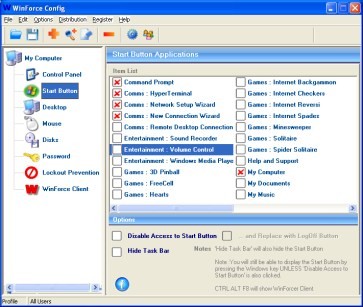
When the WinForce Config program is loaded you will see many options, some of which are ticked. The items that are ticked are those that are blocked by WinForcer. You can amend your configuration by ticking and unticking the items of your choice.
At first you will only see the items listed in the control panel, to see items on the start menu or on your desktop click on the appropriate icon on the left hand side. You can also add brand new programs by using the find / add facility from the menu.
Once you have decided on your configuration you may click on save. WinForcer will then automatically update itself without you having to log off or restart your machine.
tags you can the password winforce config winforce client the items the winforce you will your configuration client will winforcer winforce using the are ticked that are
Download WinForcer 3.3

Purchase:  Buy WinForcer 3.3
Similar software
WinForcer 3.3
Narrowgate
Prevent unauthorised users from running any Windows application you specify.
 MyOdd Desktop Application 2.10
MyOddweb.com
MyOdd is a complex application that allows you to take control of your desktop and processes currently running on your system.
 Desktop Manager & Policy Editor 1.0
BITLOGIC Software
Desktop Manager & Policy Editor - if you require control over access to a PC or on what changes a user can make to the Windows interface then Desktop Manager is the solution.
 Install-Block 1.2
Bash Software
Install-Block is tool that helps you to protect,password protect the installation of programs.
 S Lock 4.5
Ur I.T Mate Group
S Lock is designed as a security feature for those of you wanting to prevent unauthorised users from using your computer.
 Power Button 1.101
Larry Lart
Power Button is a software application designed to give you the ability to automatically start/stop the external hardware associated with a desktop application just in one click, as you usually start a desktop application (such as winamp or windows media player).
 Key Logger 5.1
Ikitek
Key Logger can record any keystrokes while Windows is running.
 ObjectBar 2.0
Stardock
ObjectBar is a program that allows users to replace or extend their Windows Start bar.
 Stop Screen Saver 1.00
RJL Software
Have you ever wanted to stop your screen saver from running during that all important presentation? Do you have restricted access to your computer and you are not allowed to disable the screen saver yourself?
Have you ever wanted to control the running of the screen saver from the click of a button? If you have answered YES to any of the questions above, then Stop Screen Saver is for you.
 Control Runner 3.4
MomSoft
Control Runner is a program launcher and manager for Windows that can substantially increase your productivity.

 RSS
RSS