Maple 9.0.5
 Maple is a useful user-friendly document organizer that helps you create your own hierarchical trees for storing information such as documents, images or notes.
|

 19.00
19.00  Trial
Trial 0K
0K
 Windows Vista
Maple is a useful user-friendly document organizer that helps you create your own hierarchical trees for storing information such as documents, images or notes.
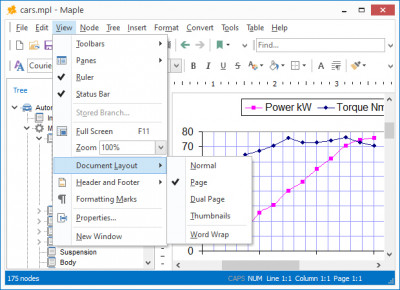
The dual-window interface, with quick-action hot buttons and drag-and-drop support, facilitates the building of your file tree. Selecting Add Node from the Tree menu creates a new "branch" for your growing tree, which you can name or later rename.
You can create unlimited nodes and sub-nodes and assign any document to each node. Clicking on the Delete Children button will delete all child nodes of a selected node. Choosing Collapse All or Expand All will expand or collapse your tree.
Maple imports and exports standard text files, Rich Text Format, Word, Windows Write, and HTML files used by Microsoft Word and other word-processors.
Other options include complete control over text and tree appearance. Use any TrueType font installed on your system, control the font size and attributes (bold, italic, underscore, or strikethrough) Onscreen you can quickly increase or decrease text size, add super- or subscript text, and change the text alignment (flush left, centered, or flush right).
You can also quickly create numbered or bulleted lists. You can also convert character sets from OEM to ANSI, and vice versa. Maple lets you create custom "styles" for your text - define a font, face, attributes, color, alignment, etc. - that lets you easily apply a style to specific text. Great for headers, captions, or entire paragraphs of text you need to distinctively separate.
Maple also has a built-in Spell Checker, and let you embed or link to objects and images. Other features include changing the case of text to all upper or lower, and Character Map, font preview in the font selection window so you get a quick peek at what a font looks like, and print preview.
A useful Preferences screen, accessible from the Tools menu, lets you minimize Maple to the system tray, activate an Autosave feature, and enable Delete Node confirmation so that you don't remove nodes by mistake.
Limitations
tags you can lets you the font can also text and nodes and from the for your you create
Download Maple 9.0.5

Purchase:  Buy Maple 9.0.5
Similar software
Maple 9.0.5
Crystal Office Systems
Maple is a useful user-friendly document organizer that helps you create your own hierarchical trees for storing information such as documents, images or notes.
 Active Document Keeper 1.21
OrionSoftLab
Active Document Keeper is a complete solution for storing and managing your home and office electronic documents.
 Secure Notes Organizer 3.0.9
SecureAction Research LLC
Secure Notes Organizer is an information organizer that allows you to build an outline of your information any way you like.
 Mind Organizer 2.0
Jean-Marc Lepers
The Mind Organizer system surpasses the usual hierarchical organization of documents.
 Gene Tree 2.3
Inspired Creations
Gene Tree will allow you to create and manage family trees (genealogical trees).
 Maple Reader 9.0.5
Crystal Office Systems
Maple Reader is a small utility that allows you to view tree files created in Crystal Office Systems' Maple application.
 File Folder Organizer 3.1.4
OPERA Tech
Have you ever tried to locate an important document, searched for it everywhere and still cannot find it? If you want an organized and orderly filing system, then you need the File Folder Organizer.
 Maple Professional 9.0.5
Crystal Office Systems
Maple Professional is the flagship of the tree outline managers for power users.
 Organizer Password Recovery Key 7.11
Passware
Organizer Password Recovery Key helps users to recover passwords for Lotus Organizer files.
 Free MP3 Organizer 3.1
Dmitry M. Maslov
Free MP3 Organizer helps you manage MP3, WAV, OGG and WMA files on your HDD, CDs or Network Drives.

 RSS
RSS