Compare Advance 1.1.16
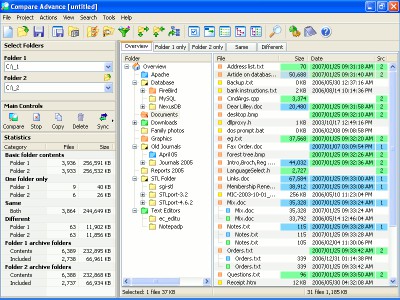
 Compare Advance software represents a very easy to use folder compare utility with powerful features that enable you to quickly and easily see the differences between two folders and resolve those differences.
|

 29.00
29.00  Trial
Trial 0K
0K
 Windows Vista
Compare Advance software represents a very easy to use folder compare utility with powerful features that enable you to quickly and easily see the differences between two folders and resolve those differences.
Compare Advance is ideal for someone who wants fine control over a backup or folder synchronize process.
Compare any two folders from the local hard drive, removable media (CD, DVD's) or over the network, and easily see the differences between them. Unique views, folder coloring, summary node and highlighting features make picking up all the differences quick and easy. Then copy or delete files as necessary to resolve the differences.
Synchronize files between your desktop and laptop computers. First compare the desired folders from each computer and then resolve the differences with the advanced synchronization dialog, which makes it easy to see what each action will involve.
Download a free 30 day trial version to see for yourself what Compare Advance can do.
Backup your important files and folders to the destination of your choice, uncompressed or as a zip archive file. A detailed log report records which files have been copied, from where to where, and notifies you if any errors have occured.
Advance. Compare Advance introduces a new feature called "Archive Folder Filtering", which in some cases can save you many megabytes of space. Don't backup folders which are simply extracted archive files.
Compare Advance features
Limitations
tags the differences compare advance differences between information about see what folders and two folders after every gives you about the between the every copy and zip
Download Compare Advance 1.1.16
 Download Compare Advance 1.1.16
Purchase:  Buy Compare Advance 1.1.16
Similar software
Compare Advance 1.1.16
BauerApps
Compare Advance software represents a very easy to use folder compare utility with powerful features that enable you to quickly and easily see the differences between two folders and resolve those differences.
 Beyond Compare 2.4.3 build 243
Scooter Software
Beyond Compare is a useful and reliable directory compare utility and a file compare utility wrapped in one.
 Quick Compare 1.0
Ur I.T. Mate Group
Quick Compare allows you to compare either 2 files, or complete folders in a matter of seconds, and have the results put in a third folder of your choosing.
 Compare & Backup 1.80
LionMax Software
Compare & Backup is an easy to use and powerful utility for directory synchronization.
 Compare catalogs 1.0
Advance Utility
The name says it all.
 SQL Server Compare 2.2
Yes Software
SQL Server Compare is an easy-to-use tool to compare 2 SQL Server database schemas and show or save the list of differences.
 Compare PDF 3.0
AKS-Labs
Compare PDF can compare both - related and non-related files.
 Compare and Merge 2.3
All Your Software
Compare and Merge is a visual file comparison utility that makes it easy to see and resolve differences between text files.
 Free SQL Compare 1.0
StarInix Software
The SQL Compare application will allow you to compare the structure of two SQL server databases and display all the differences between them.
 StarInix Database Compare 2.0.15
StarInix Software
The StarInix Database Compare application will allow you to compare the structure of two databases and display all the differences between them.

 RSS
RSS