CleanDisk 3.2
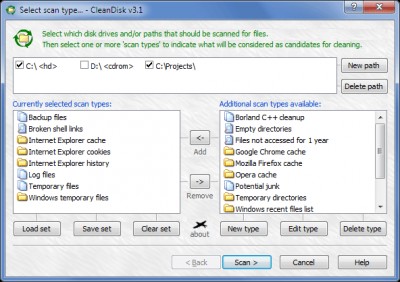
 There are many kinds of temporary files, backup files, log files, cache files and other files of a similar nature that slowly eat up your hard disk space.
|

 19.00
19.00  Trial
Trial 0K
0K
 Windows Vista
There are many kinds of temporary files, backup files, log files, cache files and other files of a similar nature that slowly eat up your hard disk space.
Using a quick and easy to use process CleanDisk will scan your hard drive for unwanted files and then assist you in removing them. It's as easy as that!
Predefined search types:
Requirements
Limitations
tags temporary files internet explorer your hard files temporary files and cache files backup files files log log files
Download CleanDisk 3.2

Purchase:  Buy CleanDisk 3.2
Similar software
CleanDisk 3.2
FMJ-Software
There are many kinds of temporary files, backup files, log files, cache files and other files of a similar nature that slowly eat up your hard disk space.
 iSysCleaner 0.7.0
Matteo Turconi
iSysCleaner - a free application that will search for junk files on your computer and allows you to delete them.
 System Cleanup 1.6
Frank van der Sluijs
Find and remove temporary, cache, history and backup files on all your local drives.
 Cache Auditor 1.0
SK Lab
The Internet Explorer Cache (Temporary Internet Files) is the location on your hard disk where Web pages and files (such as graphics) are stored as you view them.
 Internet Cache Cleaner 1.01
Pierre-Marie DEVIGNE
Internet Cache Cleaner will safely clean internet explorer cache.
 Mars Wincleaner 1.8 beta 2
Mars Software
Mars Wincleaner is the program for cleaning up your Windows from unnecessary files.
 History Cleaner 10.3
InterTech
Clean internet history, cookies, temporary internet files (cache), index.
 IEHistoryX 2.2.6.70
585Soft
IE HistoryX will help you easily find, view or selective delete user data like visited websites history, cookie files, typed URLs, temporary Internet files (Internet Explorer cache files), autocompletion form data, including the saved passwords.
 Clear Cache Feature for Internet Explorer 1.0
Microsoft Corporation
Clear Cache Feature for Internet Explorer is intended to automatically erase all temporary Internet files, cookies and history files when it is installed and executed.
 SyncBot 3.2
whyEye.org
The third generation of SyncBot will allow you to easily backup all kinds of files on a FTP-Server.

 RSS
RSS