SOCKShell 1.3
 The Windows Explorer's File menu and context menu (the menu displayed when you right click on an item in the Explorer window) display the options that operate on the selected object.
|

 14.00
14.00  Trial
Trial 0K
0K
 Windows Vista
The Windows Explorer's File menu and context menu (the menu displayed when you right click on an item in the Explorer window) display the options that operate on the selected object. These operations include the standard Cut, Copy, Delete and Rename operations if they are appropriate, and will often include other operations which are specific to the type of object that was clicked on.
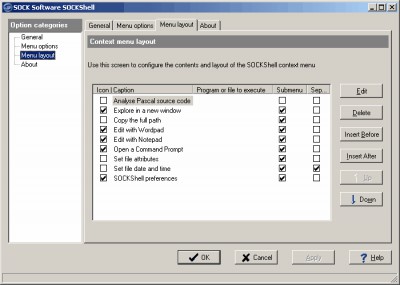
SOCKShell enhances and expands the Windows Explorer context menu by adding a number of new predefined options and allowing the user to add any number of his own options, both to the main context menu and to the SOCKShell submenu.
SOCKShell features
Limitations
tags the selected selected file the windows windows explorer context menu command prompt with windows set file and folder date and file with and time set the
Download SOCKShell 1.3

Purchase:  Buy SOCKShell 1.3
Similar software
 Windows Context Menu Manager 1.02
Private
Windows Context Menu Manager is a useful program that allows you to remove/restore file, folders, drives, Internet Explorer context menus.
SOCKShell 1.3
SOCK Software
The Windows Explorer's File menu and context menu (the menu displayed when you right click on an item in the Explorer window) display the options that operate on the selected object.
 Context Menu Editor 1.0
Brett Bartholomew
Context Menu Editor can view and delete links to programs on your context menus (the popup menus you see when you right-click).
 GetMeThere 1.2
Alfred, C. S. Li
GetMeThere is an Windows Explorer context menu extention.
 Context ThumbView 1.8.6
ContextMagic.com
Context ThumbView is a Windows Explorer context menu extension that will provide image preview directly in the right-click menu.
 StudioZai Menu Organizer 1.2
StudioZai.com
Use StudioZai Menu Organizer to make your system's context menus more clean and easy to navigate.
 Context Menu Extension DLL 3.1
Dmitry Miloserdov
The Context Menu Extension DLL is a very easy way to add Windows Explorer context menu extension (like WinZip) into your own software applications.
 ShellMenuView 1.40
Nir Sofer
ShellMenuView is a small tool that display the list of static menu items that appeared in the context menu when you right-click a file/folder on Windows Explorer.
 Fast Explorer 3.1.11.430
Alex Yakovlev
Fast Explorer is a handy utility that will allow you to manage context menus items of file objects displayed in a file manager, such as Windows Explorer or Total Commander.
 Folder Cruiser Lite 1.02
FrontBrain Software
Folder Cruiser Lite puts an icon in the system tray (area near the clock) on your computer.

 RSS
RSS