IconXP 3.37
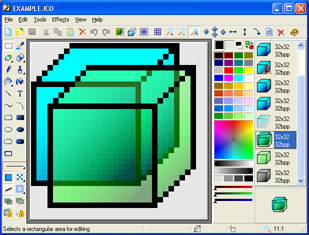
 IconXP allows you to edit icons and customize Windows.
|

 29.00
29.00  Trial
Trial 0K
0K
 Windows Vista
IconXP allows you to edit icons and customize Windows. It supports the new icon format introduced in Windows XP.
Using this program you can create and edit icons in either standard or custom sizes, with color depths up to 32-bit True Color with 8-bit alpha channel.
Paint tools include: color replacer, spray can, color selector, brush, pencil, flood fill, line tool, text tool, rectangle, ellipse, curve, 3d frame.
Modifiers can also be used to apply color gradients and chess fills.
For Windows XP icons, you get to add cool drop shadow and smooth effects. IconXP allows you to import, export and change color palettes for icon images.
IconXP allows you to change standard Windows icons, folder icons and customize desktop attributes. You can easily replace, colorize and save the icons Windows uses to display various objects - My Computer, Recycle Bin, Internet, Start menu items, drives, system folders and your own folders.
You can also hide or change shortcut overlays. There are also commands that change the desktop icons size and color resolution, rebuild the icon cache.
IconXP features
Limitations
tags and edit edit icons bmp jpeg iconxp allows you can create and allows you system folders folders and items drives start menu bin internet internet start
Download IconXP 3.37

Purchase:  Buy IconXP 3.37
Similar software
IconXP 3.37
Aha Soft
IconXP allows you to edit icons and customize Windows.
 Icon sushi 1.21
towofu
icon sushi it is an icon convert tool that supports the mask editor and the creation of Windows XP 32bit icons.
 Turbo Icon Editor 2.0.1
MagicrSoft
Turbo Icon Editor is an application that helps you create, edit, convert icons.
 IconoMaker 3.35
Icon Empire
IconoMaker allows you to edit icons.
 IconUtils 2.02
Aha Soft
IconUtils is a full featured icon and cursor solution.
 CustomIcons 4.3
Aha-soft
CustomIcons is an ultimate tool for customizing the icons on your desktop, in Windows Start menu, for your folders and many other locations.
 Image Icon Converter 1.3.5
JosesSoft
Image Icon Converter converts BMP, JPEG, GIF, PNG, TGA, TIF and PCX formats into Windows icons.
 ICL-Icon Extractor 5.14
Icon Empire
ICL-Icon Extractor is an application that allows you to search for and extract icons.
 E-Icons 4.15
Giovanni La Sala
E-Icons helps you to replace any of the standard Windows 9x/ME/2/XP icons in an easy way.
 Apear Icon Maker 6.5
Pear Software
Apear Icon Maker is a small and easy-to-use icon-editing program.

 RSS
RSS