CustomIcons 4.3
 CustomIcons is an ultimate tool for customizing the icons on your desktop, in Windows Start menu, for your folders and many other locations.
|

 15.00
15.00  Trial
Trial 0K
0K
 Windows Vista
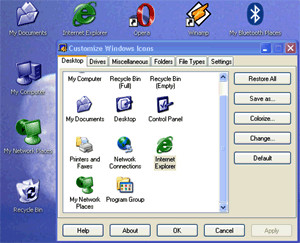
CustomIcons is an ultimate tool for customizing the icons on your desktop, in Windows Start menu, for your folders and many other locations. Using CustomIcons you can easily replace default Windows icons with the ones to your choice and customize a wide variety of desktop attributes.
Are you bored with your standard run-of-the-mill desktop, which looks exactly like thousands of other desktops all over the world? Aha-soft CustomIcons provides an easy and elegant solution for this problem! Using this small handy tool you can easily replace standard Windows icons with the ones you like and customize desktop attributes. You can change even those icons that cannot be changed using standard Windows tools.
CustomIcons lets you find and extract icons and manage icon libraries. With this program you can extract icons from .ico, .cur, .ani files, Windows executables, libraries (including .icl, .dll, .scr, .il, .nil, .ocx, .vbx, .dpl, .bpl and several other file types).
You can import .png, .gif, .bmp, .jpg, .wmf images into icon collections. With CustomIcons, you can split compound icons into simple images and break down entire icon libraries into individual icons. You can also create your own icon libraries for better and more efficient icon storage.
The special .icc icon collection format allows save source information for icons. CustomIcons scans files, folders and all local drives for icons, deletes duplicate icons from libraries, sorts icons within libraries, supports drag and drop operations (for specifying the source files/folders from Windows Explorer or other file managers) and sorts icons inside collections. You can find out any icon properties, view icons using different display modes, copied and pasted icon images from/to other applications.
If you like to tweak your system, CustomIcons will definitely be a great addition to your utilities collection.
tags you can icon libraries extract icons icons from you like for icons sorts icons files folders standard windows other file and customize easily replace can easily
Download CustomIcons 4.3

Purchase:  Buy CustomIcons 4.3
Similar software
CustomIcons 4.3
Aha-soft
CustomIcons is an ultimate tool for customizing the icons on your desktop, in Windows Start menu, for your folders and many other locations.
 FolderIcons 1.20
CyLog Software
FolderIcons is an MS Windows customizing tool, that helps you change the icons of your file system's folders.
 E-Icons 4.15
Giovanni La Sala
E-Icons helps you to replace any of the standard Windows 9x/ME/2/XP icons in an easy way.
 XP Icons 3.0
Camtech 2000, Ltd.
Give your Win98/Me/Win2k System icons the look of XP by changing your Start menu, Drives, Desktop, Folders and various file type icons to XP.
 Perfect Icon 2.45
Aha-soft
PerfectIcon is a useful, easy and reliable instrument for icon creating from pictures and photos.
 WinPersonalizer 5.3.2
Liang HONG
WinPersonalizer is an integrated tool to customize your Windows look, The all-in-one customizing application for Windows XP/98/ME/2000.
 My Tools 1.00
Bremerica
The ultimate solution for optimizing your Desktop, My Tools represents the next generation of Windows desktop menus.
 Fk Desktop 3.017
Farkas Software
Why do you have only one desktop, if you can have as many as you wish? If you have installed a lot of applications, surely your desktop is full with icons and shortcuts to different archives and folders.
 Bee Icons 4.0.3
ArcticLine Inc
Bee Icons is a reliable program which allows you by means of only several mouse clicks to replace a lot of shell icons to those ones you do like.
 IconTweaker 1.12
Joost Verburg
IconTweaker is a freeware software that enables you to customize all your Windows icons.

 RSS
RSS