i.Disk 1.91
 i.
i.
|

 0.00
0.00  Freeware
 0K
0K
 Windows Vista
i.Disk - Ever wanted to know where all the used space on your hard disk was hiding?
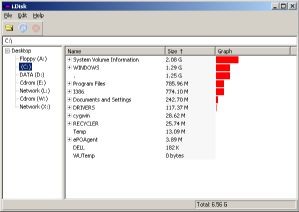
i.Disk scans directory trees and displays the total space used by each directory in an easy to use form. You can drill down into the directorys to understand the layout of space. And when you want to clean up your disk there are same handy tools there to help. The directory called '.' is the space used by files in the base directory you are scanning from.
i.Disk is a software that allows you view disk space.
Usage:
Browse to a directory -or- click on one of the disks listed on the left to start scanning. Once the scan is complete the red cancel button will grey out. The entry marked "." relates to the files in the directory your scanning from and not any of the subdirectories. If you attempt to delete this then you'll be deleting the directory you scanning from and all files and folders contained within. This is probably not what you intended. Especially if you scanning a whole disk (i.e. C:)
Then you can open any sub-directories by clicking the '+' next to the name.
Each entry in the list has a right click menu to:
Touch...
This sets the modified time on a set of files in the subdirectory and all it's children to the current time. You can specify multiple extensions by separating with space character, e.g.:
*.gif *.png *.html
Delete Files...
This deletes some or all of the files in the subdirectory and all it's children. The directories are left intact. You can specify multiple extensions by separating with space character.
Delete Directory...
This deletes all of the files and directories in the subdirectory then removes the subdirectory as well.
tags the subdirectory you can the files scanning from and all the directory multiple extensions specify multiple separating with with space this deletes space character can specify
Download i.Disk 1.91

Similar software
i.Disk 1.91
Matthew Allen
i.
 DiskSpaceExplorer 1.1
Minh T. Nguyen
Disk Space Explorer is a simple utility that scans the entire hard disk and provides size-related information of each folder and its subfolders.
 Disk Piecharter 2.3
Zorn Software
Disk Piecharter for Windows is a Graphical Disk Explorer that shows disk usage per file and per directory in a piechart.
 Disk Space Recovery Wizard 2012
Digital Millenium Inc
Disk Space Recovery Wizard will help you regain even 500MB of disk space.
 Disk Analyzer 1.1
PrimaSoft PC, Inc.
Disk Analyzer is a useful freeware Windows 95/98/Me/NT tool that enables computer owners to analyze hard disk space.
 DiskTriage 8.1.5
TimeAcct
The most powerful disk space scanning, analysis and reporting utility there is! Disk Triage will provide you with the information you need to better understand and manage the contents of your disk space
With the advent of LAN based RAID Arrays in the Terabytes and home PCs shipping with hard drives that are measured in the hundreds of Gigabytes - it has never been more important to know not only how much space is being used, but where it is being used, who is using it and what it is made up of.
 Disk Space Usage 2.4
SimonsWare
Disk Space Usage works on Novell file system volumes.
 Floppy Zip Disk Rescue 1.2.1.5
DigitByte Studio
Floppy Zip Disk Rescue is an easy-to-use tool to rescue corrupt file from Floppy disk and ZIP disk or other peripheral devices.
 Disk Space Inspector 3.9.3
AdvexSoft LLC
Disk Space Inspector is a feature-packed, yet easy to use, useful and reliable hard disk analysis, file management and disk space reporting software.
 Advanced Space Hunter 2.53
Jimjams
A.

 RSS
RSS