FolderView Activex Control 2012
 A FolderView control displays a list of folders (and files) and allows browsing of the shell's entire namespace.
|

 125.00
  Shareware
 0K
0K
 Windows Vista
A FolderView control displays a list of folders (and files) and allows browsing of the shell's entire namespace.
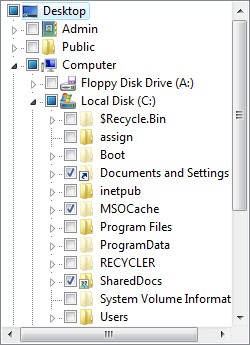
FolderView Activex Control is a highly customizable, powerful ActiveX control which provides functionality identical to the tree pane in Windows Explorer, with unique features:
Customized background
The background of the control can be set to any color or a tiled graphic. The graphic may scroll with the contents if you wish. The fore color can also be customized.
Context-menus
When an item is right clicked with the mouse, its shell context-menu pops-up exactly as in Explorer.
Remove or rename, folders and files
Items may be renamed or deleted on the fly. The control will also rename or remove the corresponding files from the system.
Drag and Drop functionality
Full drag and drop functionality is supported. Folders or files can be dragged from the control and dropped into any target that can accept them and folders or/and files can be dropped into the control.
FolderView will automatically scroll its contents or expand collapsed folders if needed and will copy or move the dropped items to the highlighted Folder.
Detailed item's info
Folderview, provides detailed information for each item, through its powerful Folder object. It returns the full path of the item it represents, its checked, selected and expanded states, many attributes that define its type, contents, capabilities and behavior, and references to the item's system icons.
Additionally, the Folder object exposes most of the properties of the Node object it belongs to, such as Child, Children, Parent, Siblings ... and returns identification information for the item in the shell's namespace, such as its PIDL and ItemID.
Customized root folder
The Root folder of the component is not restricted to Desktop. Any Special folder in the system can be set as Root, so browsing can be specified according your needs.
Auto-Update
Implements optional auto refresh mode, where any changes within the shell's namespace (such as renaming, moving or deleting items) are automatically and immediately reflected in the control.
Customized treeview appearance
FolderView, exposes all "Appearance" properties of the underlying Treeview control, such as HasButtons, HasLines, HasLinesAtRoot, HideSelection, Indent etc.
Control system errors
Allows control of whether the shell will automatically display error messages as a result of invalid folder selection (i.e. selecting a removable drive containing no disk or selecting a disconnected network share).
Powerful set of events
Gives you total control over what happens, through a powerful set of Events that will inform you of user actions as they take place.
Possible Uses
- In any case you need browsing of the shell's namespace.
- FolderView, is a powerful tool that must exist in any developer's set of components, as it can be used in a variety of applications.
tags the shell the control and files the item information for will automatically dropped into folder object namespace such powerful set root folder files can and drop
Download FolderView Activex Control 2012
 Download FolderView Activex Control 2012
Purchase:  Buy FolderView Activex Control 2012
Similar software
FolderView Activex Control 2012
Inspired Creations
A FolderView control displays a list of folders (and files) and allows browsing of the shell's entire namespace.
 .NET Folder View 1.0
Pi-Sys Labs
The FolderView component is presented as effective and modern replacement of legacy ActiveX controls for navigation and viewing of file system objects.
 FolderView 2.1
South Bay Software
FolderView lets you view the contents of any folder on your computer, and then print it out or save it to a text file on disk.
 JRFile Viewer Activex 1.2
JR Software
JRFileViewer is a ActiveX control that allows software developers to add a file and drive list to their applications with a couple of lines of code.
 ShellPlus Components 3.0
Shell+ Development Group
ShellPlus Components are for Delphi and C++ Builder developers who would like to implement shell/namespace extensions without having to invest large amounts of valuable time investigating the practices and pitfalls of Windows Shell development.
 Folder Size Shell Extension 3.2
Space Dolphin
Folder Size Shell Extension is a handy shell extension that adds a new tab to the Properties dialog that displays a folder`s or drive`s size.
 Shell MegaPack ActiveX 2012
Sky Software
Shell MegaPack ActiveX brings drop-in Windows Explorer shell browsing functionality to your application.
 Shell Places Bar Editor 1.00
Flexigensoft.com
With Shell Places Bar Editor is a free utility with the help of which you can easyly change buttons on places bar in shell open and save dialogs.
 ABF Favorite Folders 1.31
ABF software, Inc.
ABF Favorite Folders will allow you to easily store, manage and access a list of frequently used folders.
 Alvas.FileControls 3.0
Alvas.Net
Alvas.

 RSS
RSS