Archive Searcher 2.1
 Archive Searcher is the perfect tool if you store thousands of important files in compressed archives.
|

 0.00
0.00  Freeware
 0K
0K
 Windows Vista
Archive Searcher is the perfect tool if you store thousands of important files in compressed archives.
As you probably know, the Windows Find File function isn't equipped to search inside archives. While it can find the archives themselves, you still have to spend time manually loading them to locate the items you need.
Until now. Archive Searcher is a specialized tool for finding directories and files located in ZIP, RAR, ACE and CAB archives.
At its simplest, you can enter in a filename and the program will tell you exactly where it is. Archive Search is capable of scanning entire local and removable drives, though you may easily target specific f


Download Archive Searcher 2.1

Similar software
Archive Searcher 2.1
Miniwish Software, Inc.
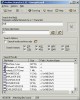
Archive Searcher is the perfect tool if you store thousands of important files in compressed archives.
 Archive Search 1.11
Gold-Software Development
Archive Search is a nice tool you can use to easily search for files inside compressed archives.
 BackupOnDemand 2.7.0.4
Caddais Software
BackupOnDemand is a real-time backup tool, that runs in the background and monitors your important files for changes.
 AJC Revision Archive 1.5.1
AJC Software
AJC Revision Archive lets you work with archives from the AJC revision control system.
 SuperCool Multiple ZIP 1.00
CW
SuperCool Multiple ZIP is an application that helps you work with multiple ZIP files.
 Compressed Archive Checker 3.1.005
Patrick Computer Services
Ensure your multi-volume file archives are complete and accurate! Compressed Archive Checker will automatically check a your archived data to see if archive members are missing from the sequence, have inconsistent byte sizes, or have bad CRC information.
 Archive Converter 1.30
WhiteTown Software
The ACVT program (Archive Converter) is a converter of archives.
 Turbo Searcher 3.50 Build 070207
KnownSoft
Turbo Searcher is the fastest utility in the world for finding any type of files through your local or network computers.
 ZippHO 3.0.6
Leviathan Soft.
ZippHO is very easy to use! In order to open a compressed file, you just double click (or a single click if you have Active Desktop enabled) on one of the archives listed in My Computer or Windows Explorer; or you can drag and drop the archive on the empty window of ZippH, or still, you can use the dialogue window "Open".
 CompreXX mark 4.1
MimarSinan International
Archives Behave Like Folders in Explorer!
Browse, copy files from, and add files to archives just like any regular folder.

 RSS
RSS