WordConvs 1.0.2.10
 WordConvs is flexible system for text conversion and formatting.
|

 69.00
69.00  Demo
Demo 0K
0K
 Windows Vista
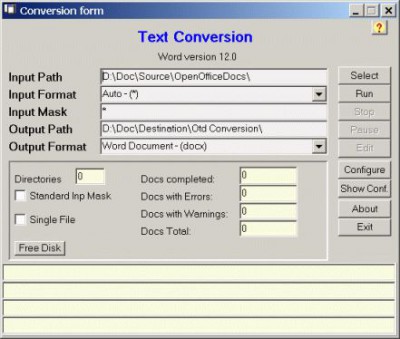
WordConvs is flexible system for text conversion and formatting. It use the text converters included in Microsoft Word 7.0 or higher to convert files written by other word processors. Moreover the program lets you change the document setting (like page with, page height, margins, that is nearly all the parameters used by MsWord). So users can standardize in one run a batch of documents written with different parameters.
WordConvs use the Microsoft Word converters¹ to convert from and to the available input and output formats. It allows also the use of an external converter program if you have one and you prefer to use it. This option can be useful if the conversion program don't has batch capability or don't allow to scan subdirectories or/and to process hidden files and folders, as WordConvs has these capabilities. It can be useful also if there is not an included mechanism to test the completeness of the conversion, as some converters in case of errors in input file truncate the conversion without any kind of indication of the fact. In case of processing of a large number of file this can be dangerous as you believe that the results are good while you can have as result some truncated document (only partially converted).
To test, also if not in a secure way, this case, a program has been inserted which count the words, lines, and characters of the input document. As MsWord has internally the possibility to count them in the output document, it is possible to compare these counters. Naturally the input file counters are only a row approximation as only managing the formatting of the input document it is possible to have a good count.
The WC.EXE² program included in the setup, is a general program (valid for document written by every word processor) but with a variable level of accuracy of the result, depending on the format of the document. For this reason the possibility to set the threshold of percent difference that give rise to a warning message, has been inserted, as well as the possibility to choose which of the 3 counters (word, lines, characters) to use (they can be used alone or in whichever mix). If a more accurate program is available to you, you can use it by setting its filename in the reserved space on the configuration dialog, as well as the 3 possible strings forming the input line command together with input and output file names set by WordConvs.
Limitations
tags the input the conversion the possibility been inserted has been input document count the input file the document microsoft word input and and output use the
Download WordConvs 1.0.2.10

Purchase:  Buy WordConvs 1.0.2.10
Similar software
WordConvs 1.0.2.10
Telsys
WordConvs is flexible system for text conversion and formatting.
 WordConvs Free 1.0
Telsys
The free version of WordConvs has the conversion function of the full version but don't allow to change the settings of the converted document.
 DocSmartz - PDF to Word Converter 3.0
DocSmartz
DocSmartz - PDF to Word Converter software will convert PDF documents into editable Microsoft Word document, retaining layout, text, and images.
 PDF-to-Word 4.0
Intelligent Converters
PDF-to-Word is a program to convert Adobe PDF documents into Microsoft Word format with a minimum loss of formatting information.
 1-2-3PDFConverter 3.0
1-2-3PDFConverter
You can convert PDF to Word documents; create PDF files; with 1-2-3PDFConverter multiple document converter.
 1-2-3FileConvert 3.0
PDF and Image Converter : 123FileConvert
1-2-3 File Convert: 1.
 Easy Text To HTML Converter 3.0.0
easy HTools
Easy Text To HTML Converter is a useful program that provides fast and easy conversion of Text Files (in *.
 StarOffice 8 Conversion Technology Preview 1.0
Sun Microsystems
StarOffice 8 Conversion Technology Preview is a plug-in for Microsoft Word 2003 that allows users of Microsoft Word 2003 to read, edit and save import to the OpenDocument Format (ODF).
 Docsmartz Professional 3.1
DocSmartz
Docsmartz Professional software is designde to be a very easy-to-use application to convert PDF files to Word or the .
 Doc2text 1.5
Wordcnv Software
Need to programmatically extract text or any data (including pictures, style properties etc.

 RSS
RSS