EscapeClose Pro 2.1
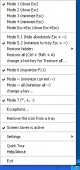 EscapeClose Pro is a small program, allowing you to close or minimize the active window by pressing the Esc button.
|

 19.00
19.00  Trial
Trial 0K
0K
 Windows Vista
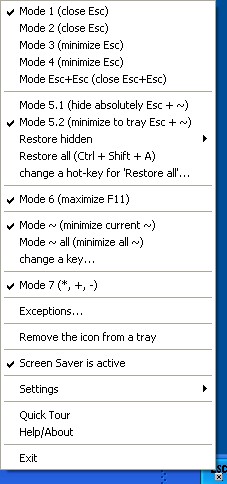
EscapeClose Pro is a small program, allowing you to close or minimize the active window by pressing the Esc button. And now you can hide active window.
Thus you can see it neither in the system tray nor in the Task Manager list (Ctrl+Alt+Del) nor in the list opening by pressing Alt+Tab. Or, to work more carefully, it can position the mouse cursor in the upper right-hand corner of the active window, where the Close button is located. It is especially useful when you are working with dozens of files and folders at once.
It has 5 working modes, stays in the TaskBar, support of exceptions, can automatically run at Windows startup, can temporally stop the screensaver start (e.g. to watch a movie). Using this program, you will make fewer movements, which will increase the productivity of your work.
EscapeClose Pro features
Limitations
tags active window escapeclose pro you can you need you have this program minimize the the active
Download EscapeClose Pro 2.1

Purchase:  Buy EscapeClose Pro 2.1
Similar software
EscapeClose Pro 2.1
SaNaPe Software
EscapeClose Pro is a small program, allowing you to close or minimize the active window by pressing the Esc button.
 EscapeClose 1.6
SaNaPe Software
EscapeClose is an absolutely free small program, that enables you to close the active window by pressing the Esc button.
 Active Captions 1.51
Shelltoys Inc.
Active Captions is a handy utility that extends window's caption buttons with additional features.
 TrayDevil 1.4.4
Ton Jenneboer Software
TrayDevil can minimize any window to the system tray and also acts as a quick reboot and shutdown tool.
 HotKey Manager 1.70
KillProg
HotKey Manager is a free and useful tool that comes with many features.
 AllToTray 4.6.3
DNTSoft
AllToTray is an application that lets you to minimize any window to your System Tray.
 NoClose 1.1
Skrommel
NoClose will help you disable the Close button (X) of selected windows
Here are some key features of "NoClose":
· Press Ctrl+1 to Enable or Disable the Close button of the active window.
 Taskbar Hide 3.5
Taskbar Management
Taskbar Hide allows you to control your taskbar and optionally hide or to unhide or arrange/rearrange programs
With Taskbar Hide you can fully control the taskbar.
 Hide Window 1.40
softinvention.org
Every day you use a number of applications (e-mail client, web browser, word processor, etc.
 Modotate 2.02.02
Takayuki Shinohara
This program will add another function button to each window, right next to the minimize button, but instead of minimizing the window, when pressed, the button will cause the window to flip up, its lower half receding into the distance.

 RSS
RSS