DateInTray 1.6
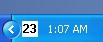
 DateInTray is a small freeware utility that displays the date in the Windows tray.
|

 0.00
0.00  Freeware
 0K
0K
 Windows Vista
DateInTray is a small freeware utility that displays the date in the Windows tray.
The day of the month is displayed in the DateInTray icon, and the entire date can be seen in a tooltip popup by holding the mouse cursor over the icon.
DateInTray is a software that brings data on your desktop.
A useful popup calendar can be brought up by clicking on the DateInTray icon. This easily accessable calendar popup is very useful when you need to quickly reference a calendar.
The calendar popup automatically shows the current date, and include arrow buttons to easily view next and previous months.
DateInTray can be easily added to the Startup folder in the programs menu so that it automatically starts every time you log in.
tags calendar popup dateintray icon the dateintray
Download DateInTray 1.6

Similar software
DateInTray 1.6
CrispyBytes Development
DateInTray is a small freeware utility that displays the date in the Windows tray.
 AMP Calendar 2.20
Alberto Martinez Perez
AMP Calendar is a small woftware utility that displays a calendar with the twelve months of a year using the Windows regional settings.
 Tray Date 1.0
Titlebar Software
Tray Date will auto start with Windows and an attractive tray icon will show the date.
 Quick Calendar 1.00
215 Technology Inc
Quick Calendar displays the day of the month in your system tray, gives you access to a multi-month calendar at your fingertips and lots more.
 Titlebar Date 2.0
Titlebar
Titlebar Date is a useful, small and freeware tool.
 Calendar Tool 2.4
Walter Holzhueter
Calendar Tool is a small application that will help you in many ways if you want to calculate difference between two dates.
 Tray Calendar 2.8g
RKS Software
Tray Calendar will help you to keep notes by day of the month in your system tray.
 TrayCalendar 2.0.004
Chris Doan
TrayCalendar is a tool which displays a perpetual calendar with a single mouse click from the system tray.
 GCS TrayClock 2.1
Gulf Coastal Software
GCS TrayClock displays the time and date over the windows clock in the system tray.
 SysDate 1.42
South Bay Software
SysDate will display the day of the month in the system tray (next to the time).

 RSS
RSS